EM500 Series Quick Start Guide
Overview
Packing List
 |
 |
 |
|
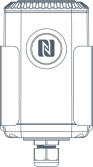
1 × EM500 Device (Include Mounting Bracket) |
4 × Wall Mounting Kits | 4 × Screw Caps |
 |
 |
 |
| 2 × Fixing Screws | 1 × Hose Clamp | 1 × DIN Rail Clip Kit (Optional) |
 |
 |
|
| 1 × Warranty Card | 1 × Quick Guide Card |
Hardware Introduction
Hardware Overview
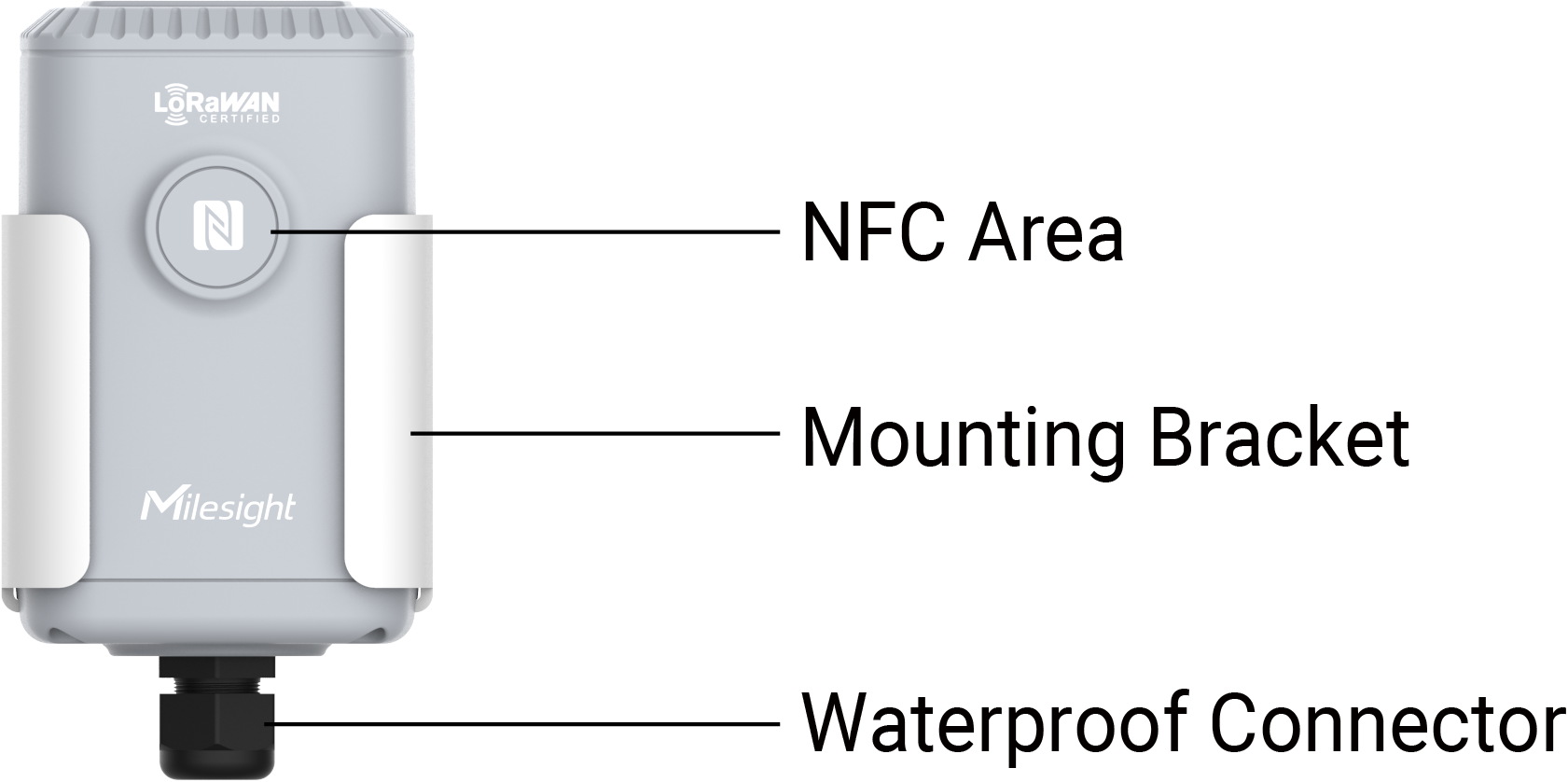
- EM500-CO2
-
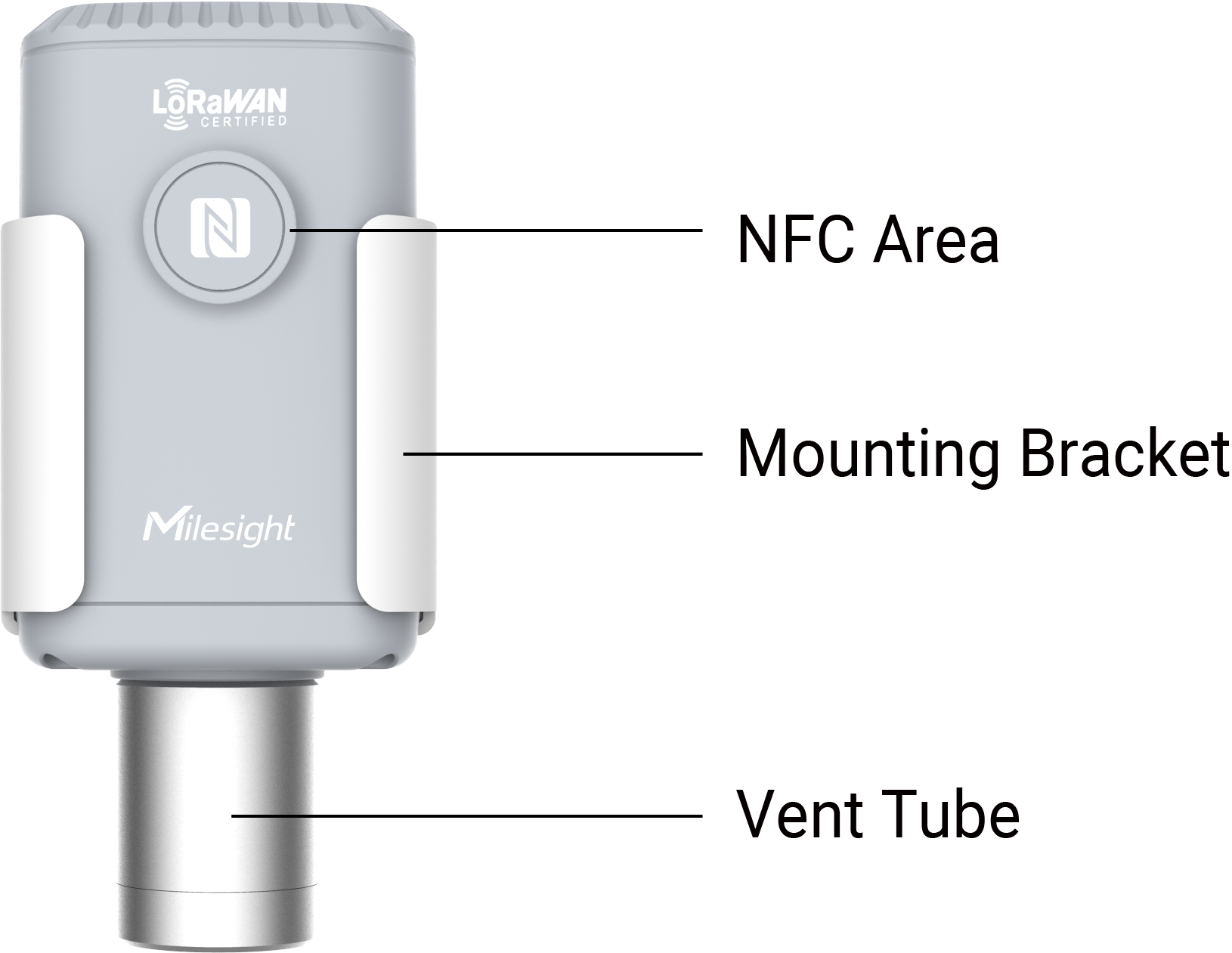
- EM500-UDL
-
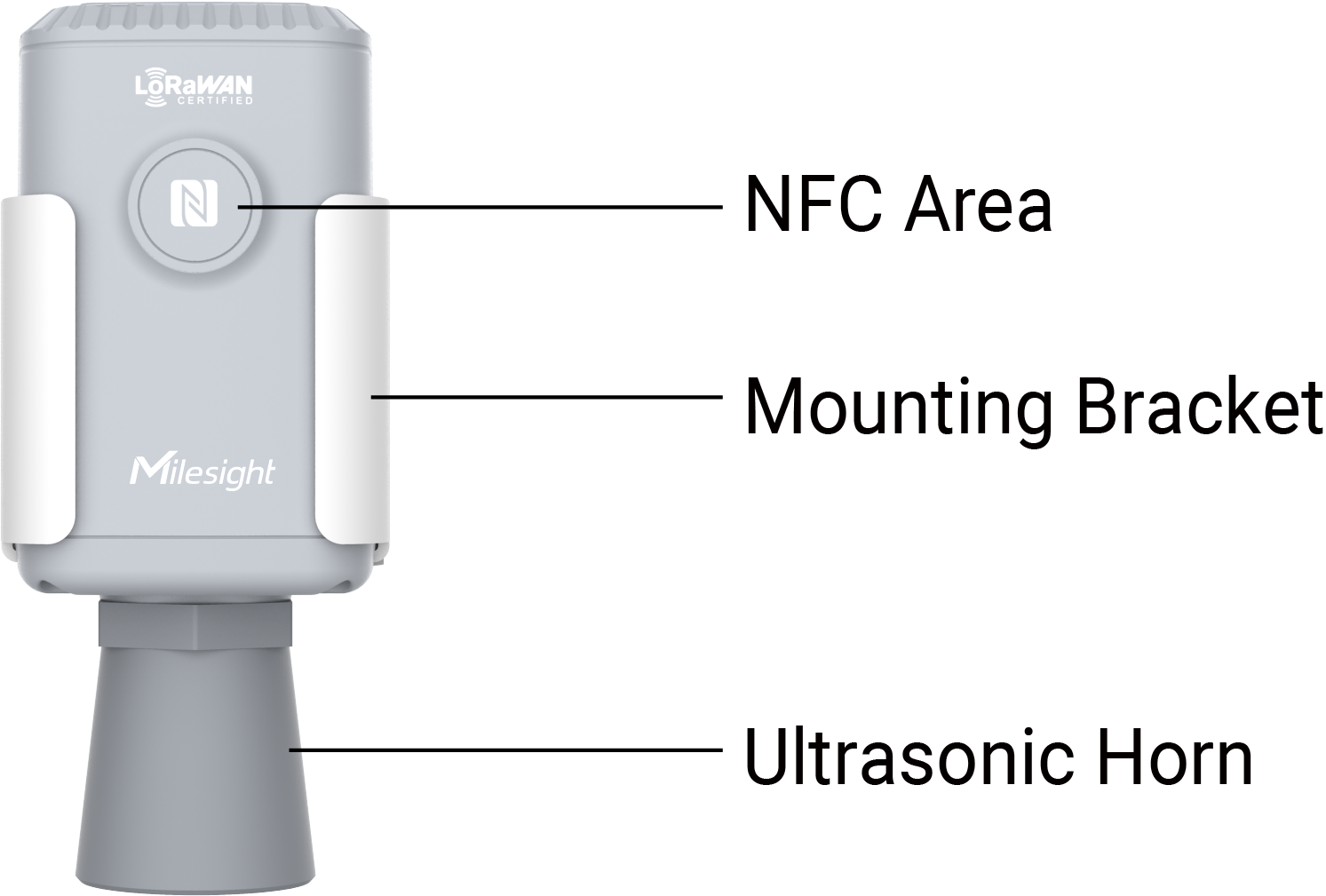
| Part | Description |
|---|---|
| NFC Area | Allows for wireless configuration through mobile phone NFC. |
| Mounting Bracket | Used for securing the device. |
| Waterproof Connector | Used for connecting external sensors and providing waterproof protection for wiring. |
| Vent Tube | Used to improve the detection accuracy of sensor. |
| Ultrasonic Horn | Core component for distance measurement based on ultrasonic technology. |
- Sensor Internal Terminal Block (EM500-PT100)
-
Pin Number Description 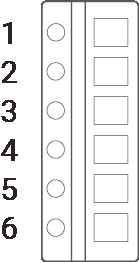
1 White/GND 2 -- 3 -- 4 Red/PT1 5 Red/PT1 6 -- - Sensor Internal Terminal Block (EM500-SMTC)
-
Pin Number Description
1 Black/GND 2 -- 3 -- 4 White/B 5 Yellow/A 6 Red/VOUT=12V - Sensor Internal Terminal Block (EM500-LGT)
-
Pin Number Description
1 Black/GND 2 -- 3 -- 4 Blue/B 5 Green/A 6 Red/VOUT=12V - Sensor Internal Terminal Block (EM500-PP/EM500-SWL)
-
Pin Number Description
1 White/GND 2 Red/AIN 3 -- 4 -- 5 -- 6 Black/VOUT=12V
Power Button Descriptions
There is a LED indicator and a power button inside the device for emergency reboot or reset.
| Function | Action | LED Indicator |
|---|---|---|
| Power On | Press and hold the button for more than 3 seconds. | Off → On |
| Power Off | On → Off | |
| Reset to Factory Default | Press and hold the button for more than 10 seconds. | Blinks quickly |
| Check On/Off Status | Quickly press the power button once. | Light On: device is on. |
| Light Off: device is off. |
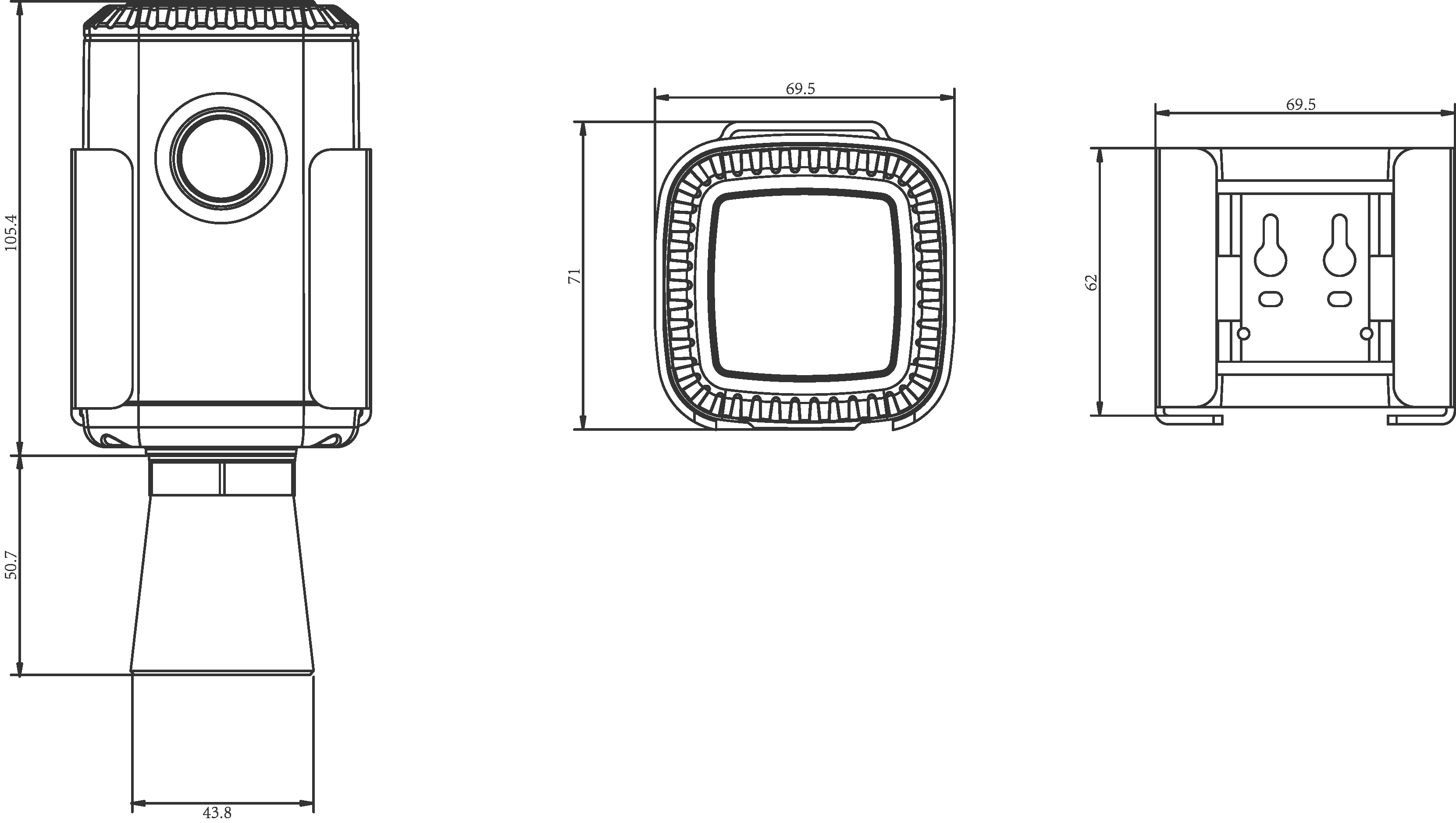
Dimensions
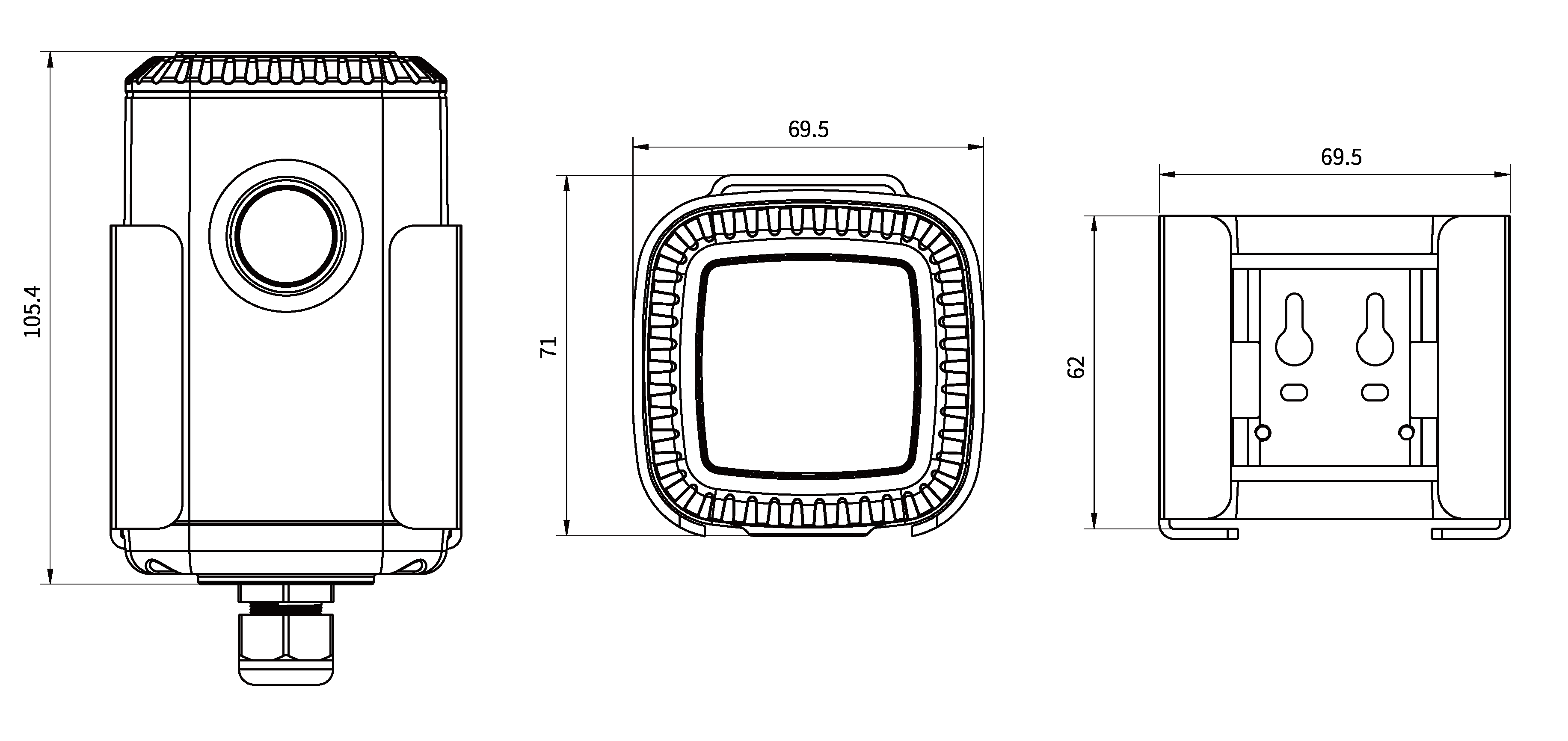
- For EM500-CO2 Only
-

- For EM500-UDL Only
-
Power Supply
The device has built-in batteries installed by default. When the device runs out of power, please refer to the following steps to properly replace the batteries.
- The device can only be powered by ER34615 Li-SoCl2 battery not alkaline battery.
- Ensure all replacing batteries are newest, otherwise it may shorten battery life or cause inaccurate power calculation.
- The battery should be removed from the device if it is not used for an expended period.
- Screwdriver
- Remove the bottom cover using a screwdriver.
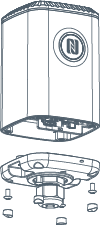
-
Replace the new batteries correctly, ensuring proper orientation and model compatibility.
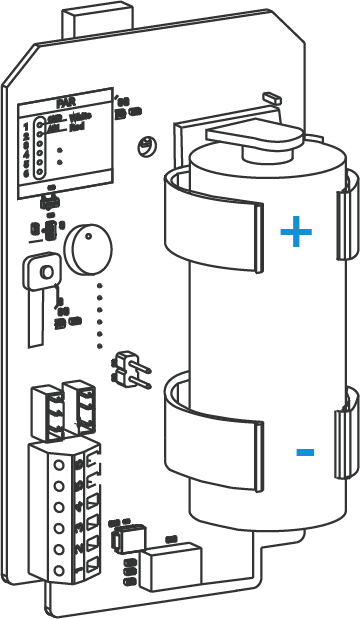
Sensor Assembly
For devices that require external sensors, the sensor terminals must be properly connected to the EM500 transceiver to make the whole device work.
- Take off the mounting bracket on the transceiver.
- Remove the screws and the bottom cover with the waterproof connector.
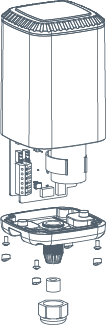
- Pass all sensor wires through the waterproof connector and leave sufficient
length for connecting to the EM500 transceiver.
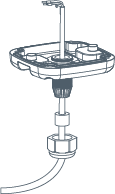
- Tighten the waterproof connector to the bottom cover.
- Screw the sensor wires to the terminal block of the EM500 transceiver
tightly referring to the label or Hardware Overview
section. Note:
- For EM500-SMTC Soil Sensor, the green wire of the soil sensor is not functional, please cut off it or insulated wrap it.
- For EM500-PP Pipe Pressure Sensor, the pipe sensor has two red wires. Please choose any one of them to connect.
- After wiring, gently pull the wires to ensure they are securely fastened to the transceiver.
- Restore everything to its due position. When restoring the bottom cover,
ensure the red arrow faces the front of the transceiver.Note: The rubber seal and rubber screw caps should be installed accordingly to prevent water from entering.

Hardware Installation
Install the Soil Sensor (EM500-SMTC Only)
Installation Requirement
- Place sensors in a representative area with the major soil type, typical terrain and average yield.
- Two or more sensors are recommended to measure the different depths in deeper rooting crops.
- Keep the sensor away from field edge for some distances to avoid edge effects.
- Do not install the sensor adjacent to large metal objects.
- When installing the sensor in a lightning-prone area, please check your lightning protection.
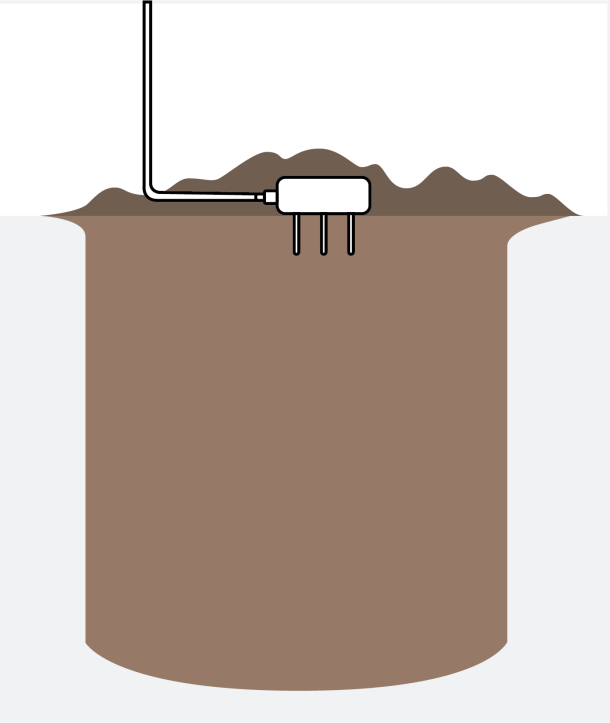
Horizontal Installation
-
Put the prongs totally into the soil to ensure accurate measurement. If the sensor prongs are exposed to the air, abnormal data may show up.
-
It is possible to get sticks, bark, roots, or other material stuck between the sensor prongs, which will severely affect the sensor data readings. Any air gaps or excessive soil compaction around the sensor can also influence the readings.
-
When removing the sensor from the soil, do not pull it out of the soil by the cable. Doing so may break internal connections and make the sensor unusable.
-
Excavate a hole or trench a few centimeters deeper than the depth at which the sensor is to be installed.
-
At the installation depth, shave off some soil from the vertical soil surface, exposing undisturbed soil.
- Insert the sensor prong into the undisturbed soil surface until the
entire sensor is inserted.Tip:
- The tip of each prong has been sharpened to make it easier to push the sensor into the soil. Be careful with sharp tips!
- If there is difficulty inserting the sensor, loosen or wet the soil.
- Be careful when inserting the sensor into dense soil, as the prongs will break if excessive sideways force is used.
- Backfill the trench, taking care to pack the soil back to natural
bulk density around the sensor body.
Vertical Installation
Prerequisites:-
Put the prongs totally into the soil to ensure accurate measurement. If the sensor prongs are exposed to the air, abnormal data may show up.
-
It is possible to get sticks, bark, roots, or other material stuck between the sensor prongs, which will severely affect the sensor data readings. Any air gaps or excessive soil compaction around the sensor can also influence the readings.
-
When removing the sensor from the soil, do not pull it out of the soil by the cable. Doing so may break internal connections and make the sensor unusable.
-
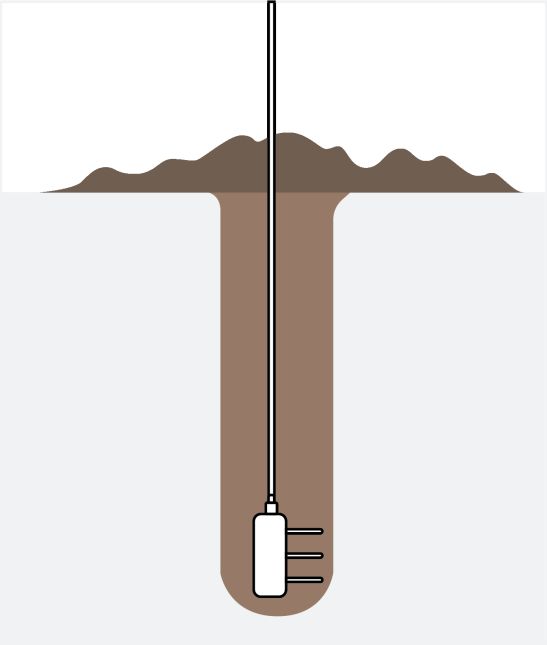
Drill a hole to the depth at which the sensor is to be installed.
- Insert the sensor into the undisturbed soil at the bottom of the
drilled hole using a hand or any other implement that will guide the
sensor into the soil at the bottom of the hole.Tip:
- If there is difficulty inserting the sensor, loosen or wet the soil.
- Be careful when inserting the sensor into dense soil, as the prongs will break if excessive sideways force is used.
- After inserting the sensor, backfill the hole, and take care to pack
the soil back to natural bulk density while not damaging the over
molding of the sensor and the sensor cable in the process.
Install the light Sensor (EM500-LGT Only)
-
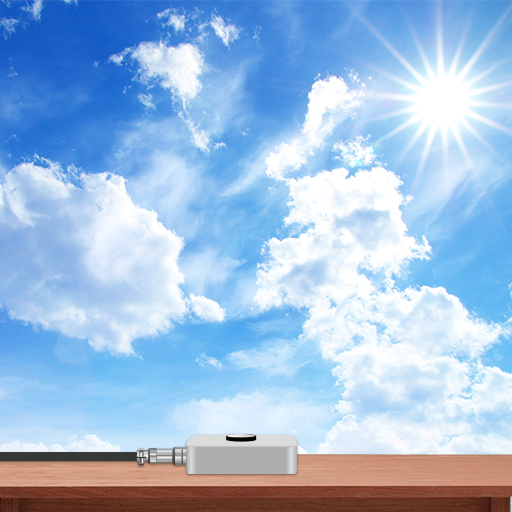
Ensure the round area of the sensor is always on top and always towards the sun while using it.
-
Mount the light sensor on a wall or a plane surface.
Install the Pipe Pressure Sensor (EM500-PP Only)
Prerequisites:
- The selected installation position should reflect the actual pressure conditions.
- Ensure the sensor is not installed too close to a valve or pump, as valve operation or pump start/stop can impact the sensor diaphragm and cause damage.
- Install the sensor in a low-vibration environment.
- If installed outdoors in winter, implement anti-freezing measures to prevent liquid expansion due to icing, which may damage the sensor.
- When measuring steam or other high-temperature gases, use a condenser such as a buffer tube (coil), and ensure the sensor’s operating temperature is within the specified range.
- Do not insert foreign objects into the pressure diaphragm to simulate pressure, as this may cause permanent damage.
- Clean the sensor regularly in environments with high corrosion or dust.
Steps:
-
Install the sensor in the pipe where the measuring medium flows straight and avoid the location of bends, splits, dead corners, or other places where vortices are easy to form.
-
If you use EM500‑PP with high‑pressure hydraulic or other liquid equipment, install a damper in order to prevent pressure spikes or surges.
Install the Submersible Water Level Sensor (EM500-SWL Only)
Installation Requirement
- The liquid pressure does not exceed the sensor's measuring range.
- The measuring liquid does not block the holes in the sensor.
- Keep away from the liquid inlet and outlet.
- If there is sediment at the bottom and it is very thick, place the sensor above the sediment.
- To prevent the separation of the sensor and the transceiver due to water shock or gravity, it is necessary to wrap the cable around a pole or fix it to a bracket.
- When the sensor is placed outdoors, please check your lightning protection.
Steps:
- Lower the sensor via cable into the liquid until it is close to the
bottom of the tanks or ponds. The sensor should be installed
vertically down.
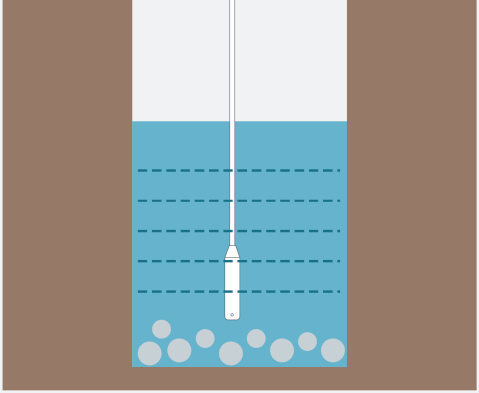
- If the sensor is to be used in a well or other locations with turbulence or other disturbances, install a pipe to protect the sensor. The pipe cannot be placed bent, and several holes should be drilled at different heights in the pipe in order to let water flow in and remove hydrodynamic pressure.
Install the Carbon Dioxide Sensor (EM500-CO2 Only)
Installation Requirement
- The device should be mounted no higher than 12-18 inches above the floor since CO2 is heavier than normal air and will flow down.
- Installation should be considered the layout of a space. Enclosed spaces or varying spaces are recommended to install one more sensor.
For detailed installation steps, please refer to the Install the EM500 Transceiver section.
Install the Ultrasonic Distance/Level Sensor (EM500-UDL Only)
Installation Requirement
- The device must sit in a vertical position on top of the object and be fitted such that it has a clear path to the object.
- Place device where it is far away the side-wall more than 30cm and without internal obstructions that block the ultrasonic signal. (Position 1)
- Position 2 is the ideal location to install EM500-UDL.
- Do not place device in the center of arched or circular container tops since it will cause multiple echoes. (Position 3)
- Do not place the device above the container inlet orifice. (Position
4)
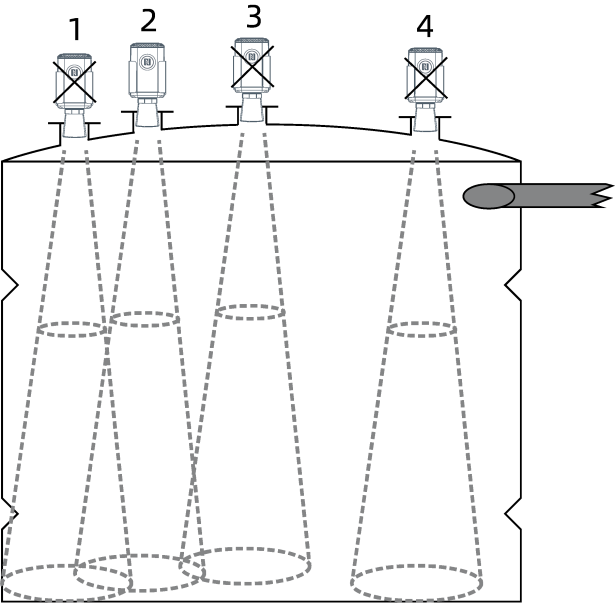
For detailed installation steps, please refer to the Install the EM500 Transceiver section.
Install the EM500 Transceiver
Prerequisites: Keep the transceiver away from metal objects and obstacles for better signal.
Wall Screw Mounting
- Wall Mounting Kits
- Electric Drill
- Fixing Screws
- Drill two holes in the wall according to the mounting bracket.
- Secure the wall plugs into the wall.
- Fix the mounting bracket to the wall via screws.
- Place the device onto the mounting bracket.
- Secure it to the bracket with two fixing screws.

Pole Mounting
- Hose Clamp
- Screwdriver
- Straighten out the hose clamp and slide it through the rectangular
holes in the mounting bracket.
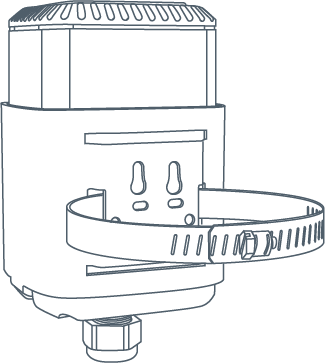
- Wrap the hose clamp around the pole.
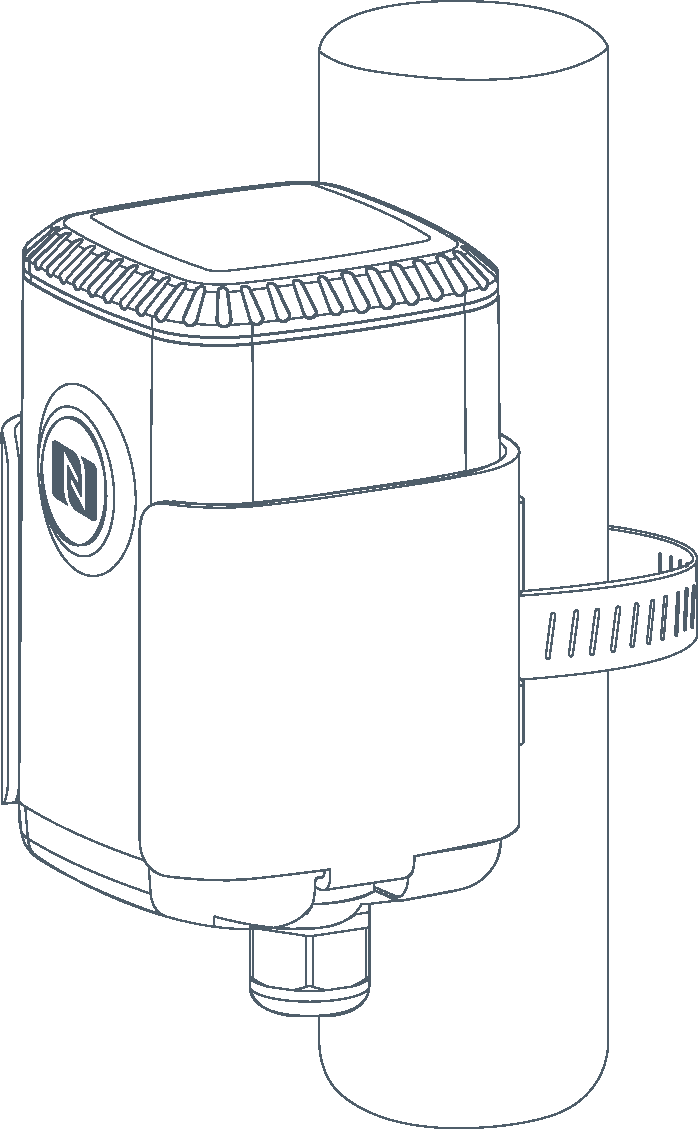
- Use a screwdriver to tighten the locking mechanism by turning it clockwise.
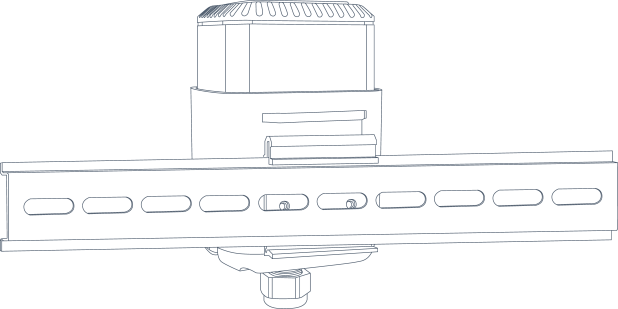
DIN Rail Mounting
- DIN Rail Clip Kit
- 35mm Wide DIN Rail
- Use 2 pcs of M3 × 6 flat head Phillips screws to fix the mount clip
to the bracket.
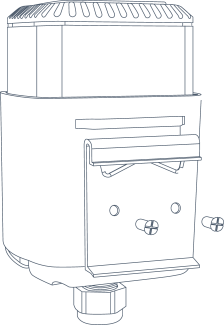
- Hang the device on the DIN rail.
Access the Device Using NFC
This section describes how to access the device using NFC. NFC is enabled by default on this device.
Prerequisites: The device is supplied with power.
Steps:
- Download Milesight ToolBox app from Google Play or Apple Store.
- Enable the NFC function on the smart phone.
- Launch ToolBox.
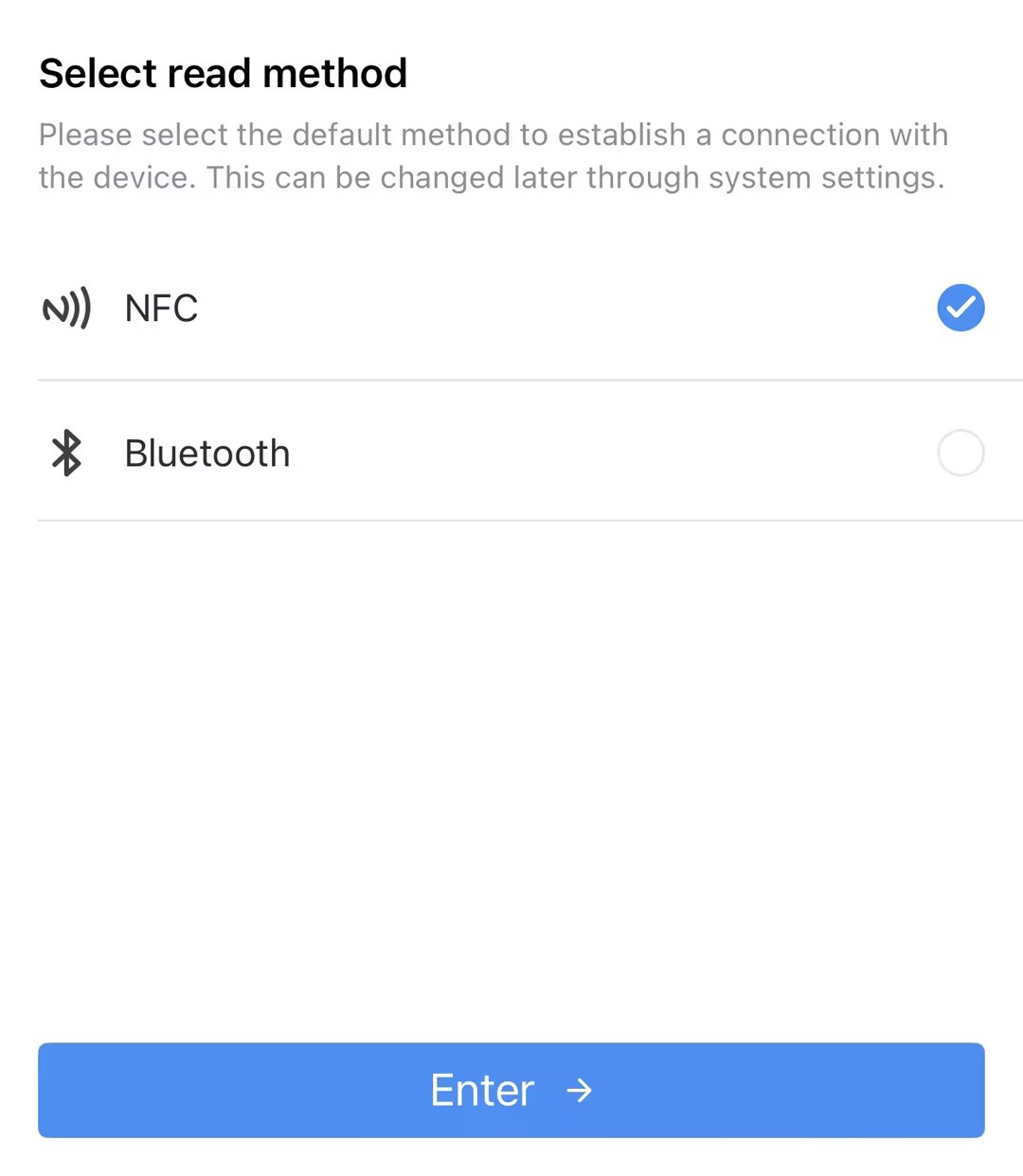
- Upon initial launch, the following page will appear. Select NFC
and click Enter.
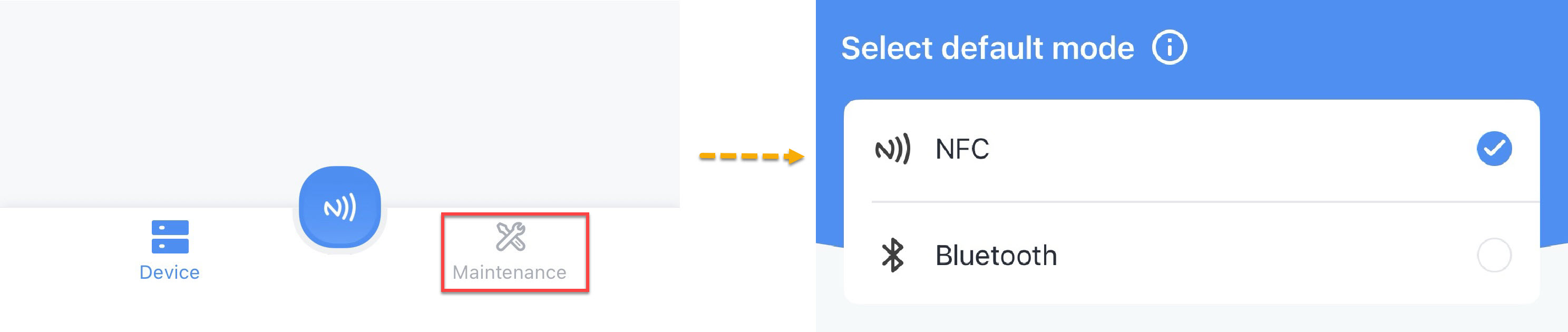
- Upon subsequent launches, Click Maintenance on the home page, and
then select NFC.
- Upon initial launch, the following page will appear. Select NFC
and click Enter.
- (Optional) To locate the NFC detection areas of the phone and the device, click Can't find the NFC location.
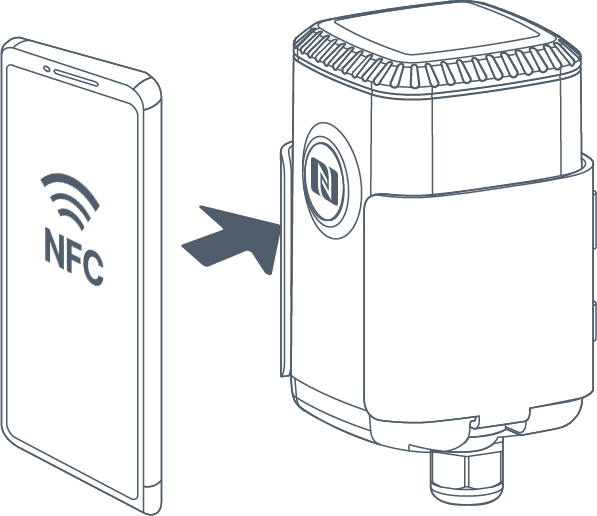
- Put the NFC detection area of the phone close to the NFC antenna of the device.Tip: It is recommended to remove the phone case.
- Click
 . If the device is recognized successfully, the homepage is
displayed. Troubleshooting: If read fails, move the phone away and reposition it close to the sensor to try again.For a description of the homepage, refer to the following table.
. If the device is recognized successfully, the homepage is
displayed. Troubleshooting: If read fails, move the phone away and reposition it close to the sensor to try again.For a description of the homepage, refer to the following table.Item Description Basic Information Show basic device information and sync the device time. Setting Set the device and network parameters. 
Import, add, export or delete a template. 
Select language, show NFC positions, check App version, etc..
FCC Statement
Any changes or modifications not expressly approved by the party responsible for compliance could void the user’s authority to operate the equipment. This device complies with part 15 of the FCC Rules. Operation is subject to the following two conditions:
- This device may not cause harmful interference, and.
- This device must accept any interference received, including interference that may cause undesired operation.
- Reorient or relocate the receiving antenna.
- Increase the separation between the equipment and receiver.
- Connect the equipment into an outlet on a circuit different from that to which the receiver is connected.
- Consult the dealer or an experienced radio/TV technician for help.
FCC Radiation Exposure Statement:
This equipment complies with FCC radiation exposure limits set forth for an uncontrolled environment. This equipment should be installed and operated with minimum distance 20cm between the radiator& your body. This transmitter must not be co-located or operating in conjunction with any other antenna or transmitter.
Related Resource
For more information, please refer to Milesight Document Center.