Hardware Introduction
Hardware Overview
- Front View
-
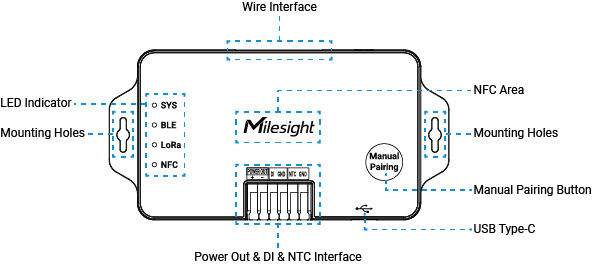
Part Description LED Indicator Refer to LED descriptions. Wire Interface Connect to the HVAC system. NFC Area Enables wireless configuration via Milesight ToolBox App. Manual Pairing Button Refer to Button Descriptions. Power Out & DI & NTC Interface (Under Development) There are three interfaces for external device connection: Power Out: Supply power to WT401 thermostat.
DI: Connect to magnet switches, keycard switches, etc.
NTC: Connect to an external NTC sensor.USB Type-C Used for power supply during configuration or device console. Mounting Holes Used to secure the device.
- Back View
-
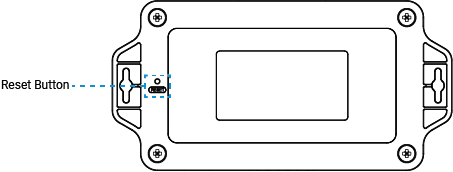
Part Description Reset Button Reboot or reset the device. Refer to Button Descriptions.
LED Descriptions
| LED | Status | Description |
|---|---|---|
| SYS | Off | The power is switched off. |
| Static On | The power is switched on. | |
| BLE | Off | The communication mode does not include BLE. |
| Slowly Blinks | The Bluetooth is not paired or pairing failed. | |
| Quickly Blinks | The Bluetooth pairing is successful and communication failed. | |
| Static On | The Bluetooth pairing is successful and communication success. | |
| LoRa | Slowly Blinks | The network is not activated. |
| Quickly Blinks Twice | The network changes to activated. | |
| Static On | The network is activated. |
Button Descriptions
| Function | Operation | LED Status |
|---|---|---|
| Cancel BLE Pairing | Press and hold Manual Pairing button for more than 3s. | BLE: Static On → Slowly Blinks |
| Reboot | Press and hold the reset button for more than 3s. | BLE, LoRa, NFC: Slowly Blinks |
| Reset to Factory Default | Press and hold the reset button for more than 10s. | BLE, LoRa, NFC: Quickly Blinks |
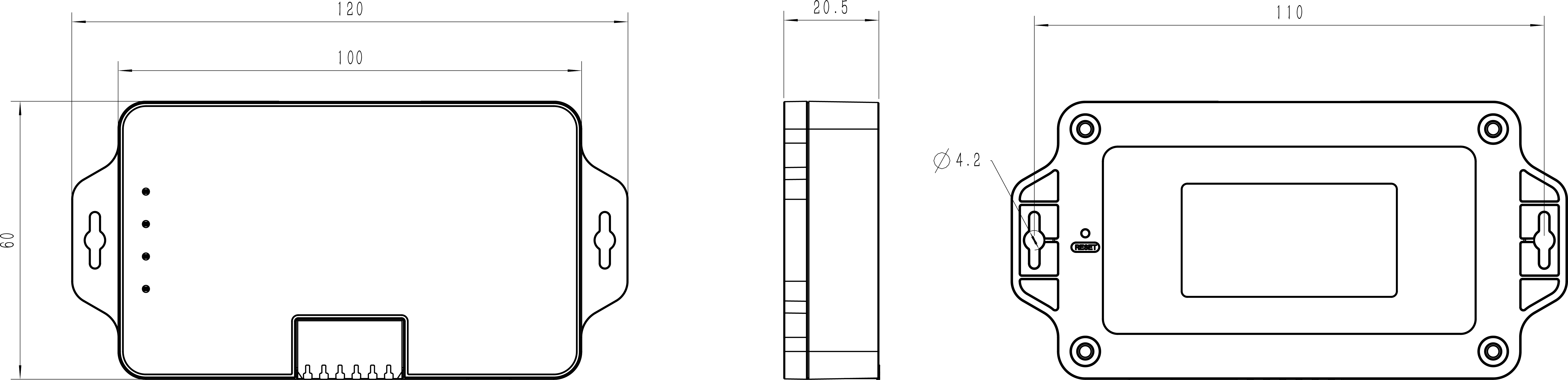
Dimensions
The following figures show the device dimensions (unit: mm).