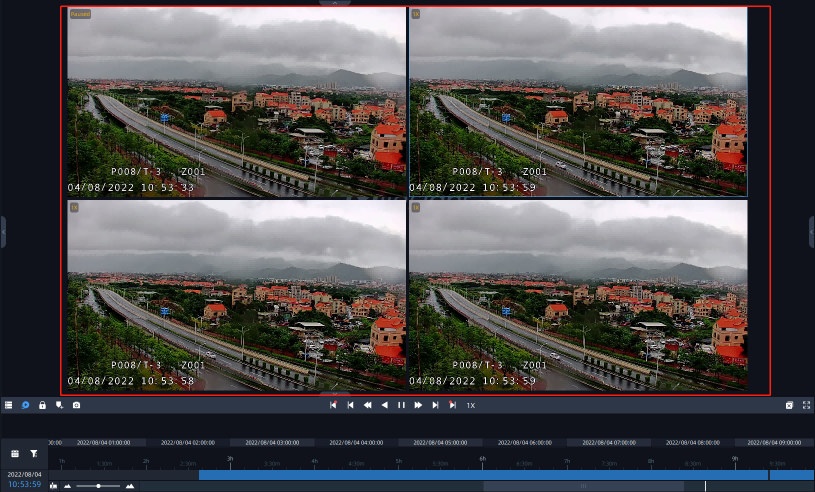
5.3 Split Playback
Split Playback allows you to divide the video file of a specified period of time into several parts when watching playback according to your needs, so that users can watch videos of different time simultaneously.
Split Playback setting steps are as below:
Step1: Right click the playback window of a camera and choose Split Playback, or right-click the selected time period on the timeline and choose Split Playback, a window will pop up as below:
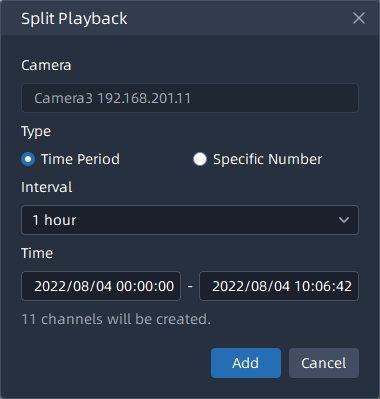
- Time Period setting page:
- Specific Number setting page:
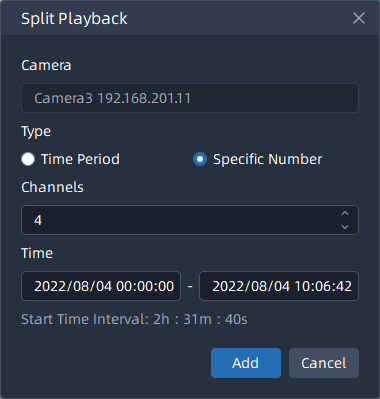
Step2: Check a type to split the video file. If you choose the Time Period, and set Time Interval and Start/End Time, then the channels will be split automatically by VMS system as above. If you choose the Specific Number, and set channel number and Start/End Time, then Time Interval will be calculated and split automatically by VMS system as above.
Step3: After setting, click  button, the selected video will be split to new
channels to replay asynchronously on the playback layout as shown below:
button, the selected video will be split to new
channels to replay asynchronously on the playback layout as shown below: