Hardware Introduction
Hardware Overview
Open the front case to check the hardware.
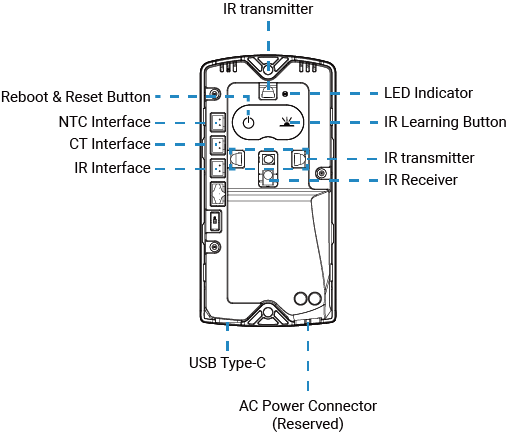
| No | Part Name | Description |
|---|---|---|
| 1 | Reboot & Reset Button | Refer to Button and LED Descriptions. |
| 2 | IR Learning Button | Refer to Button and LED Descriptions. |
| 3 | NTC Interface | Connect to an external NTC sensor to detect the temperature to monitor air conditioner operating status. |
| 4 | CT Interface | Connect to an external current transformer to monitor air conditioner's operating status. |
| 5 | IR Interface | Connect to an external IR emitter when the controller cannot be installed within the effective IR control range. |
| 6 | IR transmitter | Transmit infrared signals to control the air conditioner. |
| 7 | IR Receiver | Receive infrared signals from the AC remote control. |
| 8 | LED Indicator | Refer to Button and LED Descriptions. |
| 9 | USB Type-C | Used for power supply (DC or battery compartment) or console access. |
| 10 | AC Power Connector (Reserved) | Used for AC power supply. It requires hardware customization before purchase. |
Button and LED Descriptions
Tip: By default, the LED indicator turns off
automatically after 10 minutes of inactivity. This configuration can be changed via
ToolBox or downlink.
| Function | Operation | LED Status |
|---|---|---|
| Network Status | The network is not activated. | Green Slowly Blinks |
| The network is activated. | Green Steady On | |
| IR Learning | Press and hold the IR Learning button for more than 3s. | Learning Failed: Red Slowly Blinks → Off |
| Learning Successful: Red Slowly Blinks → Red Steady On 5s | ||
| Reboot | Press and hold the Reboot & Reset button for more than 3s. | Green Slowly Blinks |
| Factory Reset | Press and hold the Reboot & Reset button for more than 10s. | Green Quickly Blinks |
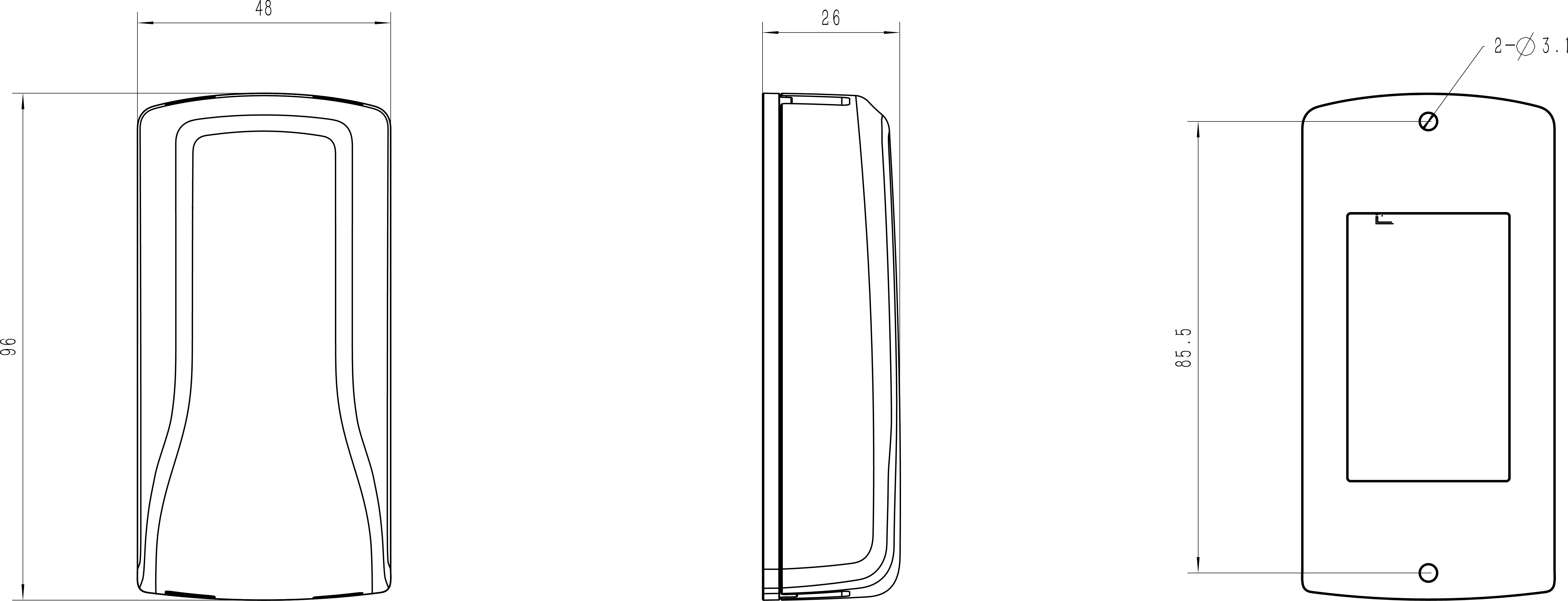
Dimensions
The following figures show the device dimensions (unit: mm).