Upgrade the Device
This section describes how to upgrade this device.
Upgrade through ToolBox
Tip: Before upgrading the device through
ToolBox, access it through NFC or Bluetooth. For ToolBox access instructions, see
Access the Device.
It is recommended to use Bluetooth to upgrade the device.
Prerequisites: Download firmware from Milesight official website and save it to the smart phone. It is recommended to consult technical support before upgrading to ensure a safe and successful upgrade.
- Navigate to Maintenance > Upgrade.
- Click Upload to select the firmware from the local path of the smartphone.
- Click Upgrade to upgrade the device.
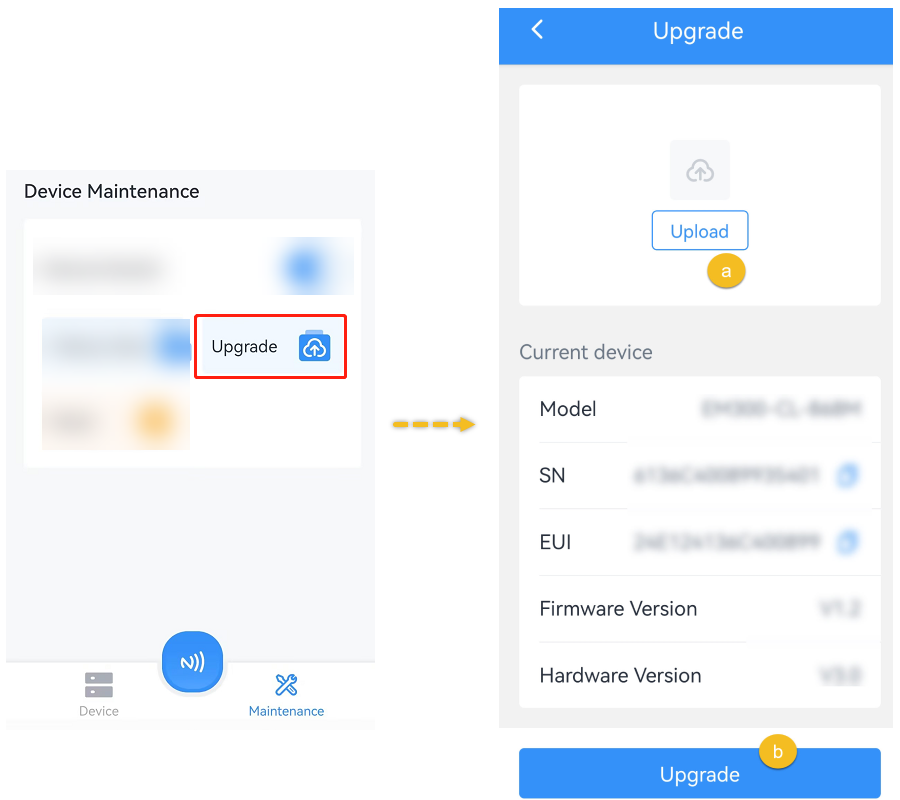
- Wait until a success message is displayed.CAUTION: Do not perform any operations in ToolBox during upgrade, otherwise, the upgrade will be interrupted or the device may malfunction.
Upgrade through FUOTA
The device also supports Firmware Update Over the Air (FUOTA) through a compatible LoRaWAN® network server.
Prerequisites:
- The firmware version is 2.1 or later.
- The communication mode includes LoRa.
- The device has joined a LoRaWAN® network.
- The network server supports FUOTA.
For the upgrade procedure, refer to the FUOTA documentation for the corresponding LoRaWAN® network server.