Hardware Introduction
Packing List
 |
 |
 |
| 1 × WS303 Device |
1 × CR2450 Battery |
2 × 3M Tapes |
 |
 |
|
|
1 × Quick Guide |
1 × Warranty Card |
Note: If any of the above items is missing or damaged, please
contact your sales Representative.
Hardware Overview
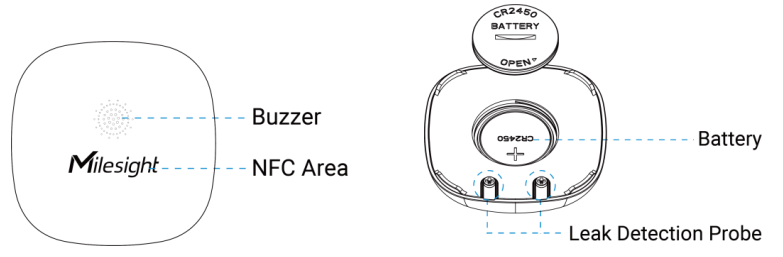
Button & Buzzer Patterns
The sensor equips with a reset button inside the device for emergency reset or reboot even if the battery is removed. Usually, users can use NFC to complete all steps.
| Function | Action | Buzzer |
|---|---|---|
|
Turn On |
Insert the battery. |
Buzzes for one time |
|
Reboot |
Press and hold the button for more than 3 seconds. |
Buzzes for every second |
| Reset to Factory Default | Press and hold the button for more than 10 seconds. | Buzzes for every 0.5 second |
| Leakage Alarm | Detect the leakage | Buzzes 3 times, pauses for 1 minute, then repeats above sequence 5 times |
Tip: The leakage alarm buzzer can be stopped when it
detects not leaking or by the downlink command.
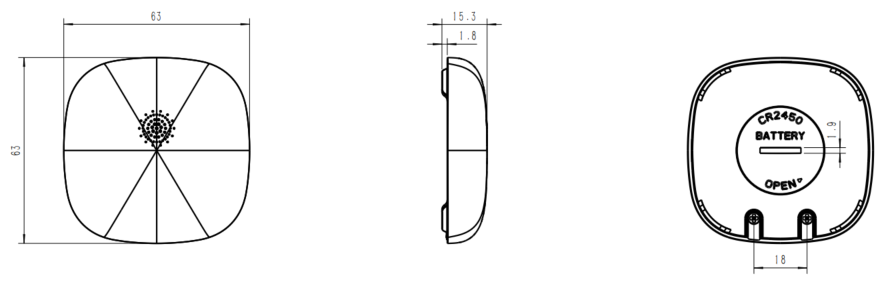
Dimensions(mm)