Upgrade the Device
The device supports local upgrade via ToolBox App or FUOTA via remote LoRaWAN® network servers. For the details of FUOTA, please refer to corresponding server guides. This section describes how to upgrade the device locally.
Prerequisites: Download firmware from Milesight official website and save it to the smart phone. It is recommended to consult technical support before upgrading to ensure a safe and successful upgrade.
Steps:
- On the homepage of ToolBox, click Maintenance in the lower right corner.
- Click Upgrade to go to Upgrade page.
- Click Upload to select the firmware from the local path of the smartphone.
- Click Upgrade to upgrade the device.
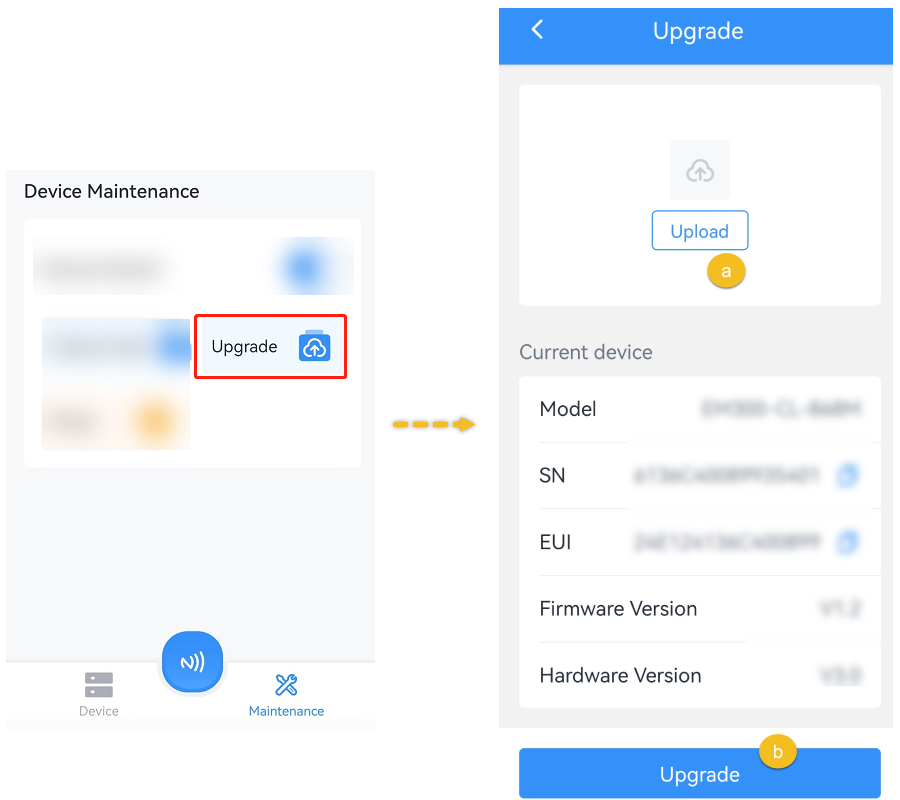
- Put the NFC detection area of the phone close to the NFC antenna of device for a
few minutes. CAUTION: Any operation on ToolBox is not allowed during upgrading, otherwise the upgrading will be interrupted, or even the device will break down.