General Settings
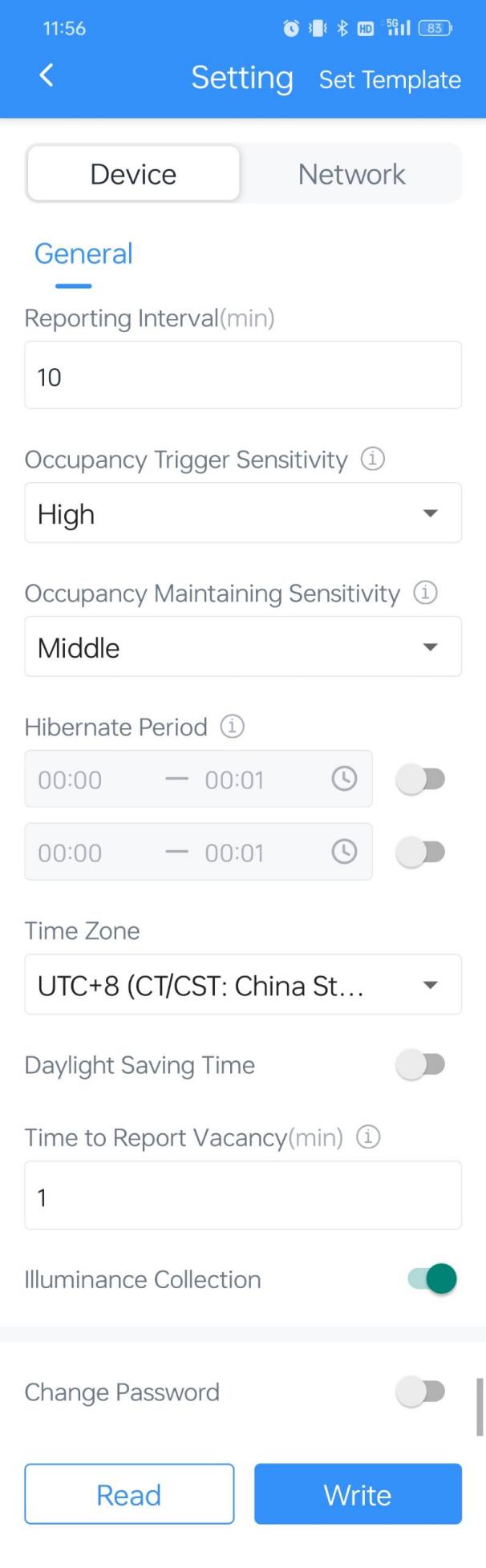
| Parameters | Description |
|---|---|
| Reporting Interval | The time interval for reporting people counting data and battery level to the network server. Default: 10 minutes. Range: 1~1440 min |
| Occupancy Trigger Sensitivity |
Adjust the responsiveness of the device to occupancy events. Higher sensitivity leads to quicker triggers but increases the probability of false triggers. |
| Occupancy Maintaining Sensitivity |
Control the time and accuracy for maintaining the operational state after detecting presence. Higher sensitivity makes it easier to detect slight movements and maintain the occupied state. |
| Hibernate Period | Disable or enable Hibernate mode and configure the Hibernate Period. It will stop detecting and reporting when hibernating. |
| Time Zone | Set the time zone of the current location. When you click Sync button of ToolBox App to sync time, the device will also sync the time zone from smartphone automatically. |
| Daylight Saving Time |
Enable or disable Daylight Saving Time (DST). Start Time: the start time of DST time range. End Time: the end time of DST time range. DST Bias: the DST time will be faster according to this bias setting. |
| Time to Report Vacancy(min) | After being released from the occupied state, it needs to wait for the idle time. If no occupancy is detected again during the idle time, the space will be considered as vacancy and the device will report a Vacant report. Default: 3min, Range: 1~60min. |
| Illuminance Collection |
Enable or disable light intensity collection. Default: Bright status ≥ 700 lux; Dim status ≤ 300 lux. When the value is higher than 700 lux, the device will report status as Bright; when the value is lower than 300 lux, the device will report status as Dim. |
| Change Password | Change the password for ToolBox App to write this device. |