Delete Group or Sub-node
This topic describes how to delete sub-node and groups.
Delete Sub-node
- Restrictions
-
- The account role is Enterprise Holder or Group Administrator.
- All devices and sub-nodes under this sub-node are deleted or removed.
- Procedure
-
- Log in to Milesight Development Platform.
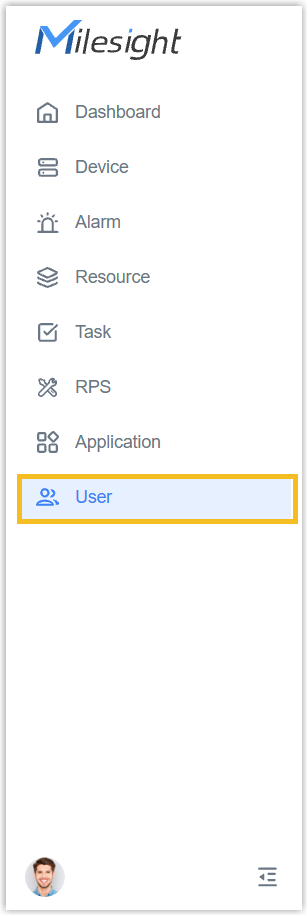
- On the left bar, select
User
tab.
- Select the desired sub-node, click Delete.
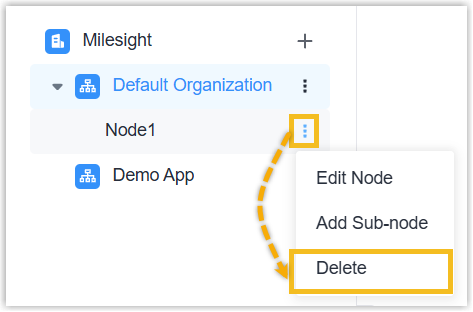
- In the pop-up window, select Delete.
- Result
- The sub-node is deleted from this group.
Delete Group
- Restrictions
-
- The account role is Enterprise Holder.
- All devices and sub-nodes under this group are deleted or removed.
-
When only one group remains under the enterprise, the group is not allowed to delete.
- Procedure
-
- Log in to Milesight Development Platform.
- On the left bar, select
User
tab.
- Select the desired group, click Delete.
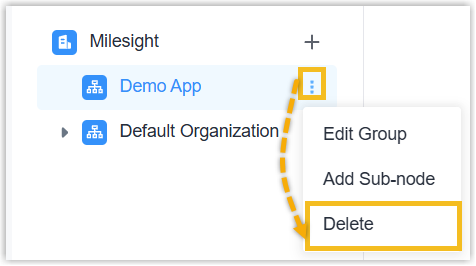
- In the pop-up window, select Delete.
- Result
- This group, with its application, is deleted from this enterprise.