Cellular
This chapter describes how to configure the settings to register to cellular network.
Prerequisites
- The supported frequencies of the SIM card matches the device model.
- Ensure the SIM card has sufficient balance and works properly in other devices.
- Ensure the device has installed the SIM card.
- Gather SIM information from the cellular operator.
Basic Settings
- On the left bar, select Network page.
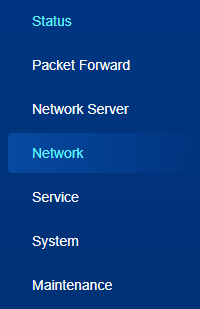
- On the top bar, select Cellular tab.
- Configure the cellular settings as required.
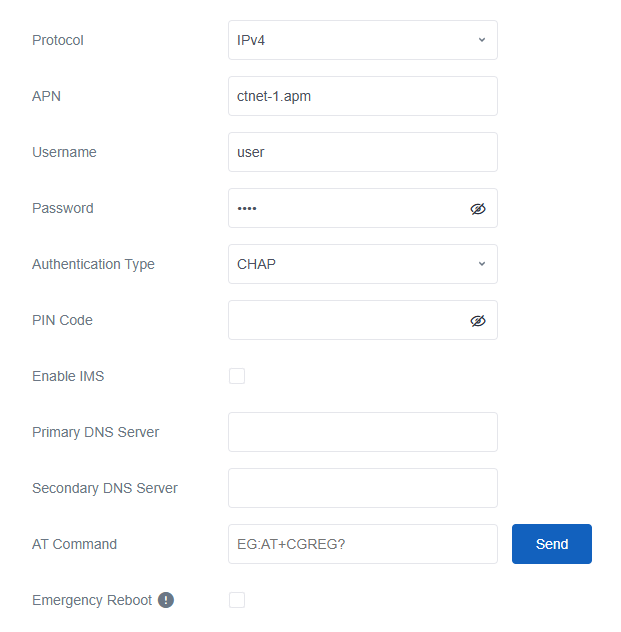
Parameter Description Protocol Select IPv4 or IPv4/IPv6. APN The Access Point Name for cellular registration and defining which external network to connect. Only letters, digits, "-" and "." are allowed, and the first character must not be "_" or ".". The maximum length is 63 characters. Username The username for cellular dial-up connection provided by local ISP. Password The password for cellular dial-up connection provided by local ISP. PIN Code A 4-8 characters PIN code to unlock the SIM. Enable IMS Enable or disable IMS feature. This parameter is only available for -L08GL model. Primary DNS Server Customize the cellular primary DNS server. If left blank, the device will use operator's settings. Secondary DNS Server Customize the cellular secondary DNS server. If left blank, the device will use operator's settings. AT Command Send AT Command to get cellular information or configure advanced settings Emergency Reboot Enable the gateway to reboot if no network link is available. - Click Save & Apply to save the settings.
- Navigate to Status > Cellular page to check if the register status is Ready and if there is cellular IP address.
Ping Detection
Ping detection allows the gateway to detect the cellular connection regularly to
ensure stable connectivity.
- On the left bar, select Network page.
- On the top bar, select Cellular tab.
- Enable ping detection and configure the related parameters.
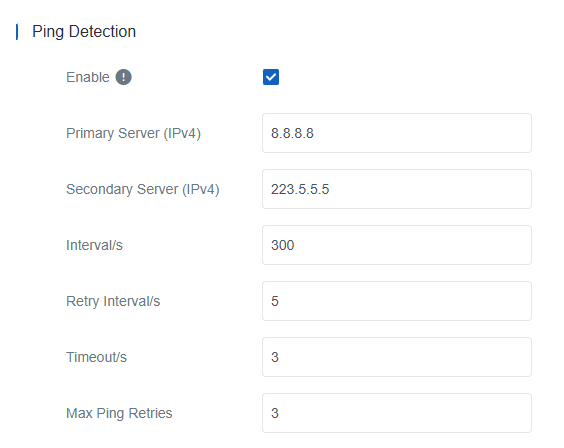
Parameter Description Enable After enabled, the device will periodically detect the connection status of the link by sending ICMP packets. Note: It is suggested to disable this option if the gateway is connected to a private, non-Internet network.Primary Server (IPv4) The IPv4 server address that the gateway pings to determine whether the connection is still available. Secondary Server (IPv4) The IPv4 server address that the gateway tries to ping if the primary server is unavailable. Interval The interval between two Ping attempts. Retry Interval The interval to retry the ping if the previous ping reaches the timeout and does not reach the max retry times. Timeout The maximum time that the gateway waits for a ping response. If no response is received within this time, the ping request is considered failed. Max Ping Retries The number of times that the gateway retries sending a ping request before determining that the connection has failed. - Click Save & Apply to save the settings.