Event & Notification
The gateway supports recording and sending event alarms. This chapter describes the event and notification settings.
Step 1. Configure SMTP Server
The gateway supports adding an email address as a SMTP server to send alarm emails.
Prerequisites: A working email address information, and ensure the email
address allows third-party app access.
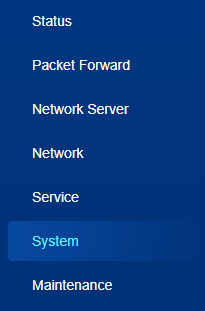
- On the left bar, select System page.
- On the top bar, select SMTP tab.
- Enable SMTP Server Settings and configure the related
parameters.
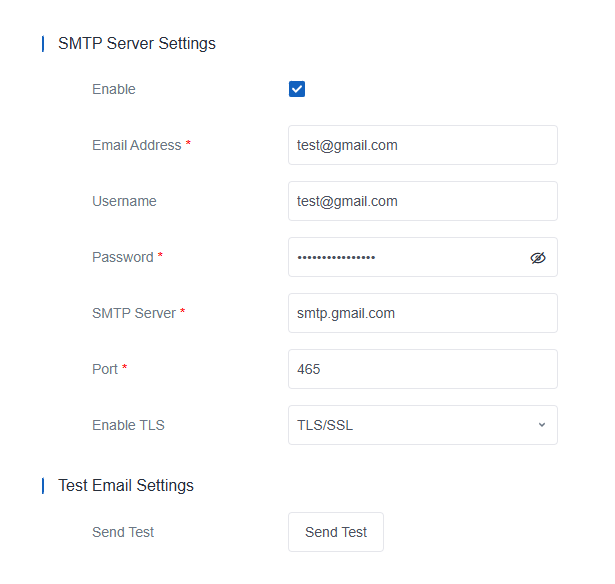
Parameter Description Enable Enable or disable SMTP server settings. Email Address The address used for sending emails. Format: xxx@xxx.xx Username Username for authentication on SMTP server. Password Password for authentication on SMTP server. SMTP Server The address of the email service provider's SMTP server. Port The port of the email service provider's SMTP server. Enable TLS Select the authentication type from None, TLS/SSL and STARTTLS. - Click Save & Apply to save the settings.
- Click Send Test. If the settings take effect, a test email can be sent out successfully.
Step 2. Configure Email Group
The gateway supports managing email groups to send email alarms.
- On the left bar, select System page.
- On the top bar, select Email tab.
- Click plus icon to add an email group and configure the related parameters.
Up to 15 email groups can be added.

Parameter Description Name Set a unique name to identify this email group. Email Address Enter email addresses into the email group, separating each address with a semicolon. 
Delete this email group. - Click Save & Apply to save the settings.
Step 3. Configure Phone Group
The gateway supports managing phone groups to send SMS alarms.
Prerequisites
- This feature is only available for -L08GL model.
- Ensure the used SIM card supports SMS services.
- On the left bar, select System page.
- On the top bar, select Phone tab.
- Click plus icon to add a phone group and configure the related parameters.
Up to 15 phone groups can be added.

Parameter Description Name Set a unique name to identify this phone group. Phone Number Enter phone numbers into the phone group, separating each number with a semicolon. Delete this phone group. - Click Save & Apply to save the settings.
Step 4. Configure Event
- On the left bar, select System page.
- On the top bar, select Events tab.
- Select the target phone group or email group to send alarms, and configure
the power parameters.
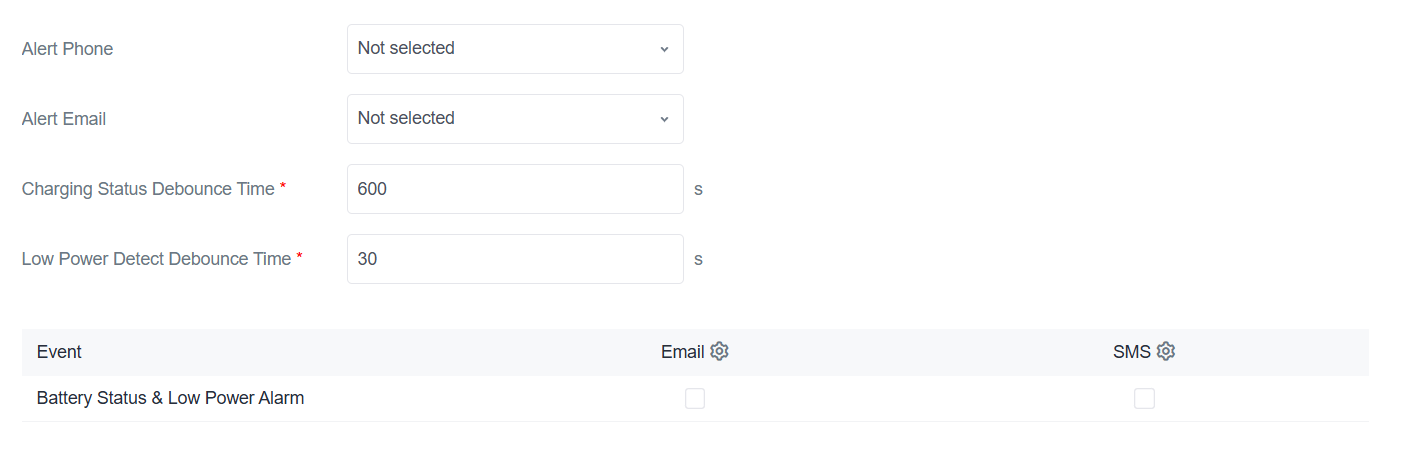
Parameter Description Charging Status Debounce Time The minimum duration that a change in charging status must persist before it is recognized and reported as an event. Low Power Detect Debounce Time The minimum duration that a change in low power status must persist before it is recognized and reported as an event. - Select the target event to enable Email or Phone alarms.
Event Description Battery Status & Low Power Alarm Send notifications when battery working status changes, low power alarm triggering or releasing. - Click Save & Apply to save the settings.