5.3.4.2 Configure Temperature Control and Fan Parameters
This section describes the settings related to the temperature and fan control.
Prerequisites
- Wiring settings are configured.
- The system is switched on.
Temperature Control Basic Settings
The thermostat supports the basic temperature control when no plan executing.
- On the homepage of ToolBox, click Setting to enter the Setting page.
- On the top bar, select Device tab.
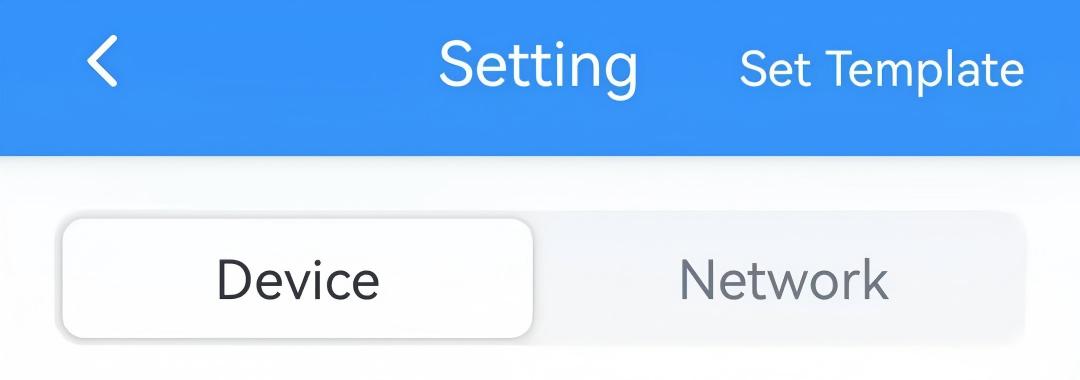
- On the General page, select the Temperature Control Mode
Enable options. The supported options depend on the Wiring settings.
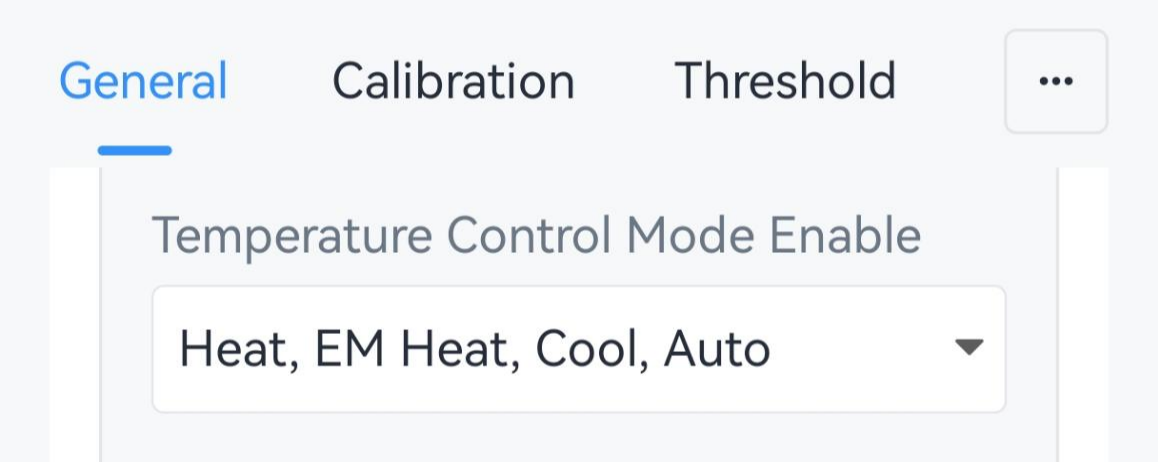
- Select the Temperature Control Mode and configure the related
parameters.
- Heat/EM Heat/Cool: When the ambient temperature is outside
the setpoint, start heating to raise the temperature or start
cooling to lower the temperature. EM Heat only works when E
terminal is connected.
Parameter Description Target Temperature Resolution Select the resolution of the target temperature. Options: 0.5: Increase or decrease target temperature by 0.5 each time.
1: Increase or decrease target temperature by 1 each time.Target Temperature Set the setpoint temperature for device control. Range: 5~35 °C/41~95 °F. Target Temperature Tolerance Set the allowable value between the ambient temperature and the setpoint to prevent frequent cycling. This parameter, along with the target temperature, defines a setpoint tolerance range that determines when the temperature control starts and stops.
Target Temperature Regulation Range Set the range to adjust target temperature. Range: 5~35 °C/41~95 °F. 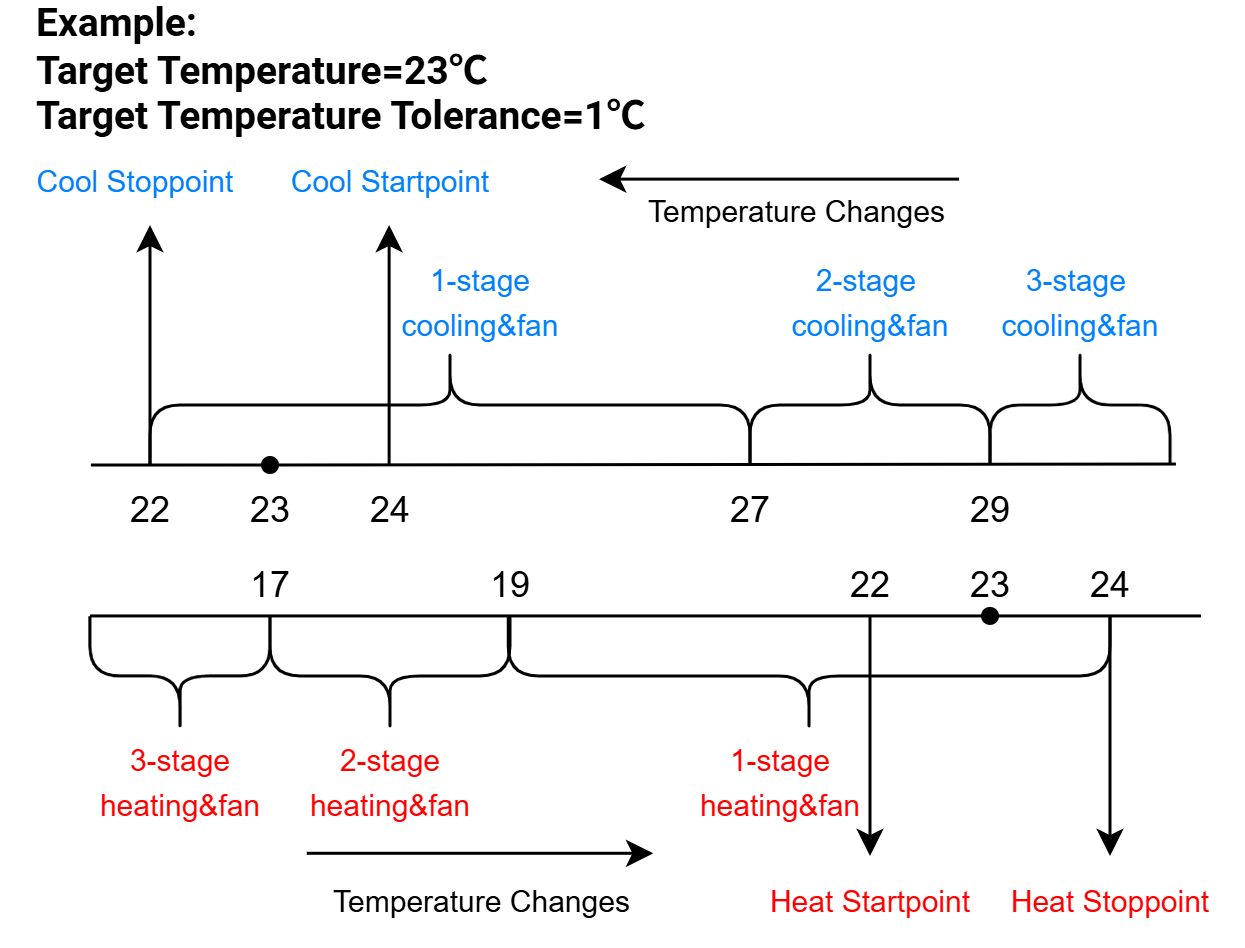
- Auto - Single Target Temperature: When the ambient
temperature does not reach the setpoint, start cooling or heating
automatically. This mode uses the same setpoint for heating or
cooling.
Parameter Description Target Temperature Resolution Select the resolution of the target temperature. Options: 0.5: Increase or decrease target temperature by 0.5 each time.
1: Increase or decrease target temperature by 1 each time.Target Temperature Set the target temperature for both cooling and heating. Range: 5~35 °C/41~95 °F. Target Temperature Tolerance Set the allowable value between the ambient temperature and the setpoint to prevent frequent cycling. This parameter, along with the target temperature, defines a setpoint tolerance range that determines when the temperature control starts and stops.
Temperature Control Tolerance Add the tolerance value based on the target temperature tolerance for start cooling/heating. Target Temperature Regulation Range Set the range to adjust target temperature. Range: 5~35 °C/41~95 °F. 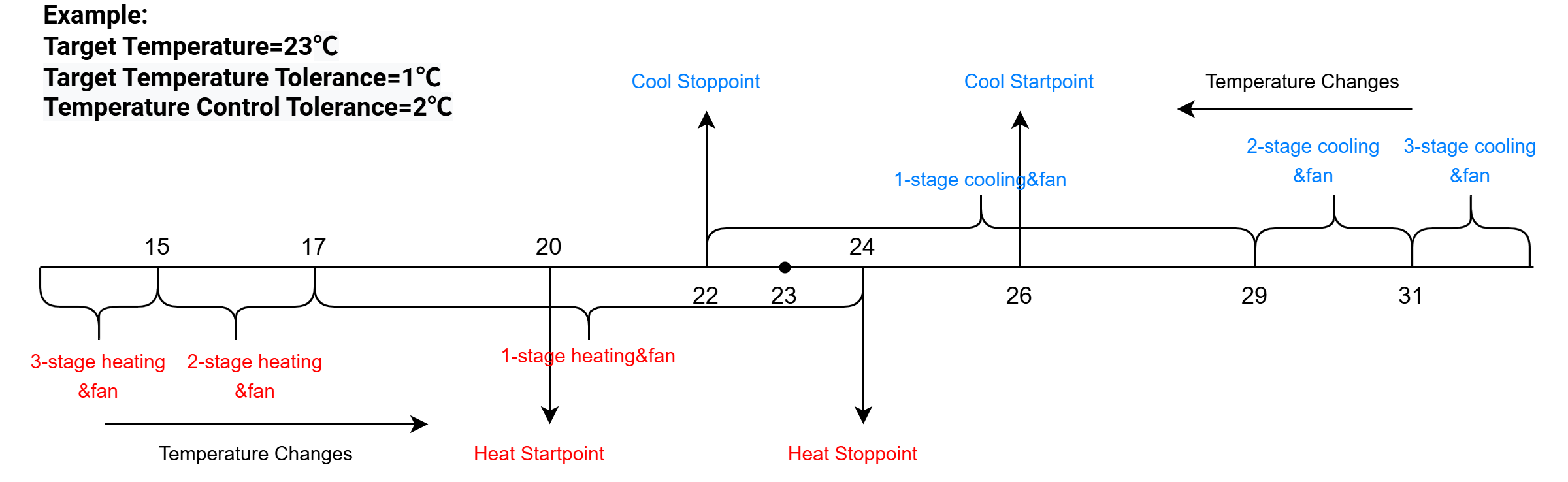
- Auto - Dual Target Temperature: When the ambient temperature
does not reach the setpoint, start cooling or heating automatically.
This mode uses different target temperatures for heating and
cooling.Note: The values must follow the rule: Heat Target - Heat Tolerance < Cool Target - Cool Tolerance, Heat Target + Heat Tolerance < Cool Target + Cool Tolerance.
Parameter Description Target Temperature Resolution Select the resolution of the target temperature. Options: 0.5: Increase or decrease target temperature by 0.5 each time.
1: Increase or decrease target temperature by 1 each time.Heating Target Temperature Set the target temperature for heating. Range: 5~35 °C/41~95 °F. Heating Target Temperature Tolerance Set the allowable deviation range between the ambient temperature and the target temperature to prevent frequent cycling. Cooling Target Temperature Set the target temperature for cooling. Range: 5~35 °C/41~95 °F. Cooling Target Temperature Tolerance Set the allowable deviation range between the ambient temperature and the target temperature to prevent frequent cycling. Target Temperature Regulation Range Set the range to adjust target temperature. Range: 5~35 °C/41~95 °F. 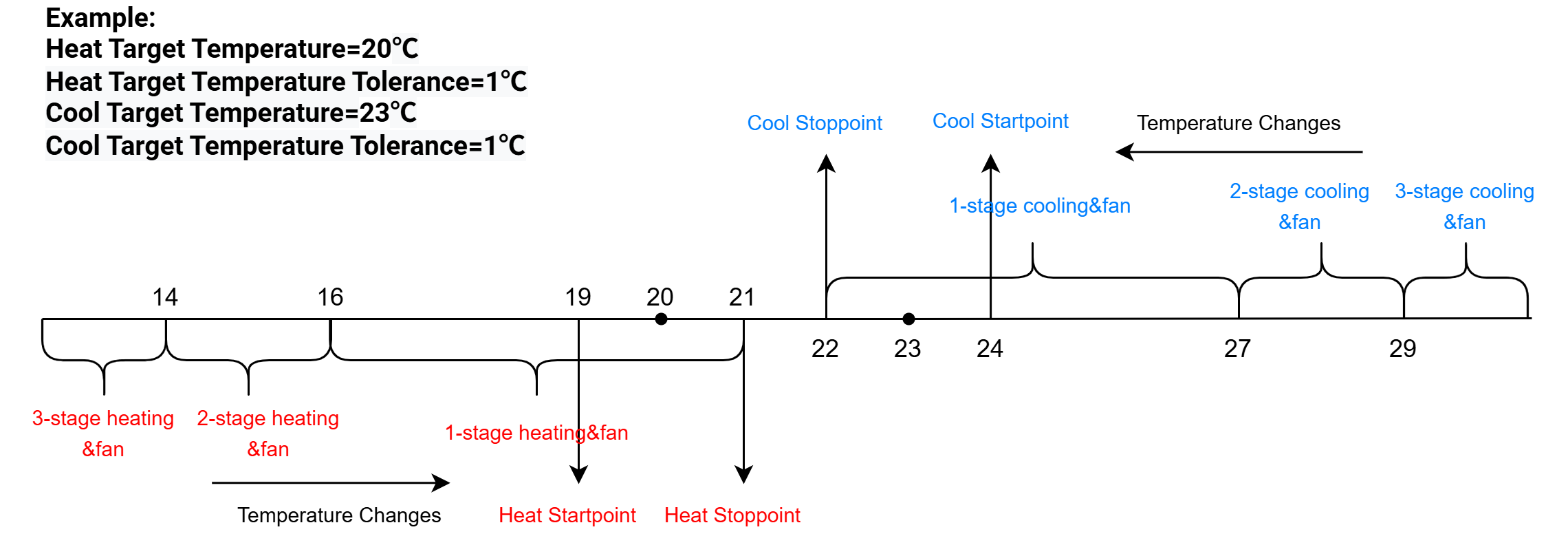
- Heat/EM Heat/Cool: When the ambient temperature is outside
the setpoint, start heating to raise the temperature or start
cooling to lower the temperature. EM Heat only works when E
terminal is connected.
- Click Write in the lower right corner, and
put the NFC detection area of the phone close to the NFC antenna of device.
If the configuration succeeds, the following page is displayed.

- JSON Command: see Temperature Control Basic Parameters
- BACnet: see Temperature Control Basic Parameters
- Raw Hex Command: see Temperature Control Basic Parameters
Occupancy Mode
This thermostat supports Occupied and Unoccupied modes, each with its own set of temperature control parameters, including target temperature, tolerance values, and regulation ranges. Switching modes automatically applies different settings for comfort and energy saving. In addition, when Occupied or Unoccupied mode is selected, Heat, EM Heat, and Auto-Heat use the same parameters, while Cool and Auto-Cool use the same parameters as well.
- On the homepage of ToolBox, click Setting to enter the Setting page.
- On the top bar, select Device tab.
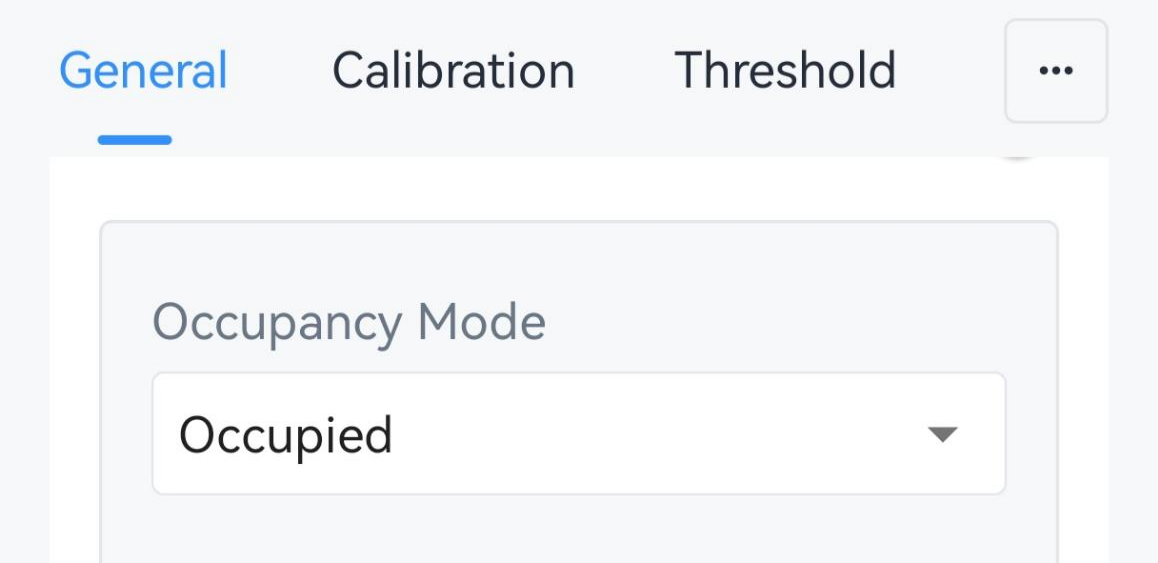
- On the General page, select the Occupancy mode as Occupied or
Unoccupied.
- Select the Temperature Control Mode Enable options. The supported
options depend on the Wiring settings.
- Configure the related temperature control parameters for this occupancy
mode.
Parameter Description Temperature Control Mode Select current temperature control mode. Target Temperature Mode When Temperature Control Mode is Auto, it's fixed as Dual Target Temperature. Target Temperature Resolution Select the resolution of the target temperature. Options: 0.5: Increase or decrease target temperature by 0.5 each time.
1: Increase or decrease target temperature by 1 each time.Heating Target Temperature Set the target temperature for heating. Range: 5~35 °C/41~95 °F. Heating Target Temperature Tolerance Set the allowable deviation range between the ambient temperature and the target temperature to prevent frequent cycling. Cooling Target Temperature Set the target temperature for cooling. Range: 5~35 °C/41~95 °F. Cooling Target Temperature Tolerance Set the allowable deviation range between the ambient temperature and the target temperature to prevent frequent cycling. Deadband Set the minimum difference between the heating target temperature and cooling target temperature. Heat Target Temperature Regulation Range Set the range to adjust heating target temperature. Range: 5~35 °C/41~95 °F. Cool Target Temperature Regulation Range Set the range to adjust cooling target temperature. Range: 5~35 °C/41~95 °F. - Click Write in the lower right corner, and
put the NFC detection area of the phone close to the NFC antenna of device.
If the configuration succeeds, the following page is displayed.
- JSON Command: see Occupancy Mode Parameters
- BACnet: see Occupancy Mode Parameters
- Raw Hex Command: see Occupancy Mode Parameters
Unilateral Tolerance
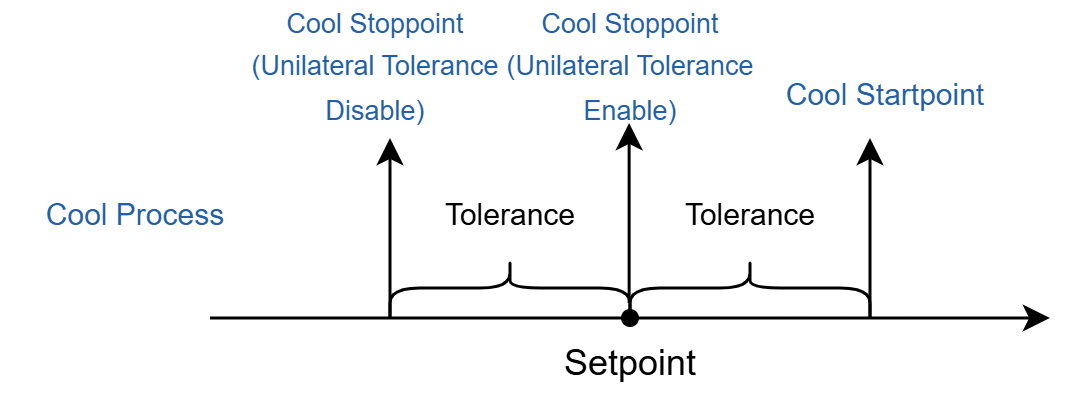
- JSON Command: unilateral_tolerance
- Raw Hex Command: Unilateral Tolerance
Fan Mode Settings
-
Fan Mode: The mode to decide how the thermostat operate the fan in the system. The thermostat supports the following control modes:
Mode Description Auto Open when the system is cooling or heating, and close when the system stops cooling or heating. On Normally open. Circulate Open for a while when the system stops cooling or heating. It supports setting the operation time hourly. - Fan Delay: Allow the fan to work for a preset duration after the system stops cooling or heating.
- Regulate Humidity: When the ambient humidity is outside the target range, the thermostat will open the fan for an interval per hour to dehumidify or humidify. This only works when fan mode is Auto.
Prerequisites: G wire is selected in Wiring settings.
- On the homepage of ToolBox, click Setting to enter the Setting page.
- On the top bar, select Device tab.
- On the General page, select the Fan Mode.If the Fan Mode is Circulate, configure the fan Operation Time per hour.
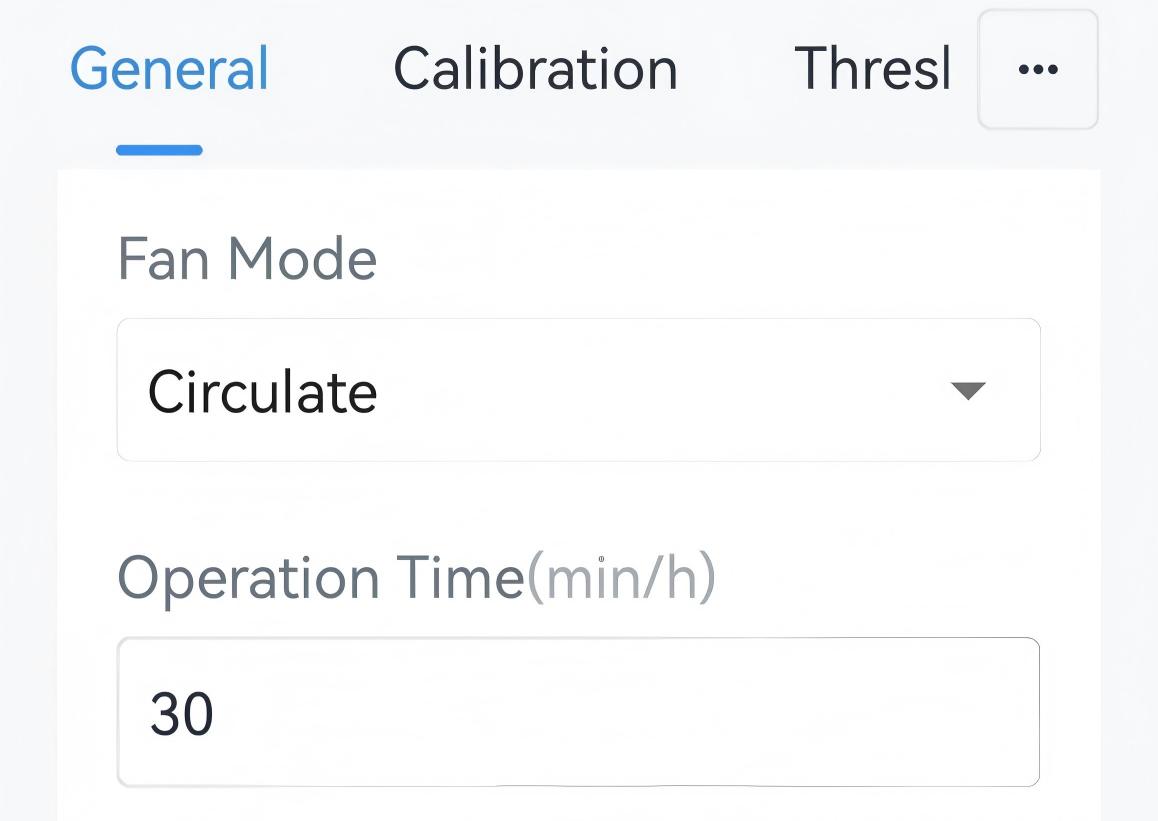 Optional: If the Fan Mode is Auto, configure Regulate Humidity feature as the following steps:
- Set the Target Humidity Range.
- Enable Regulate Humidity and configure the interval as
required.
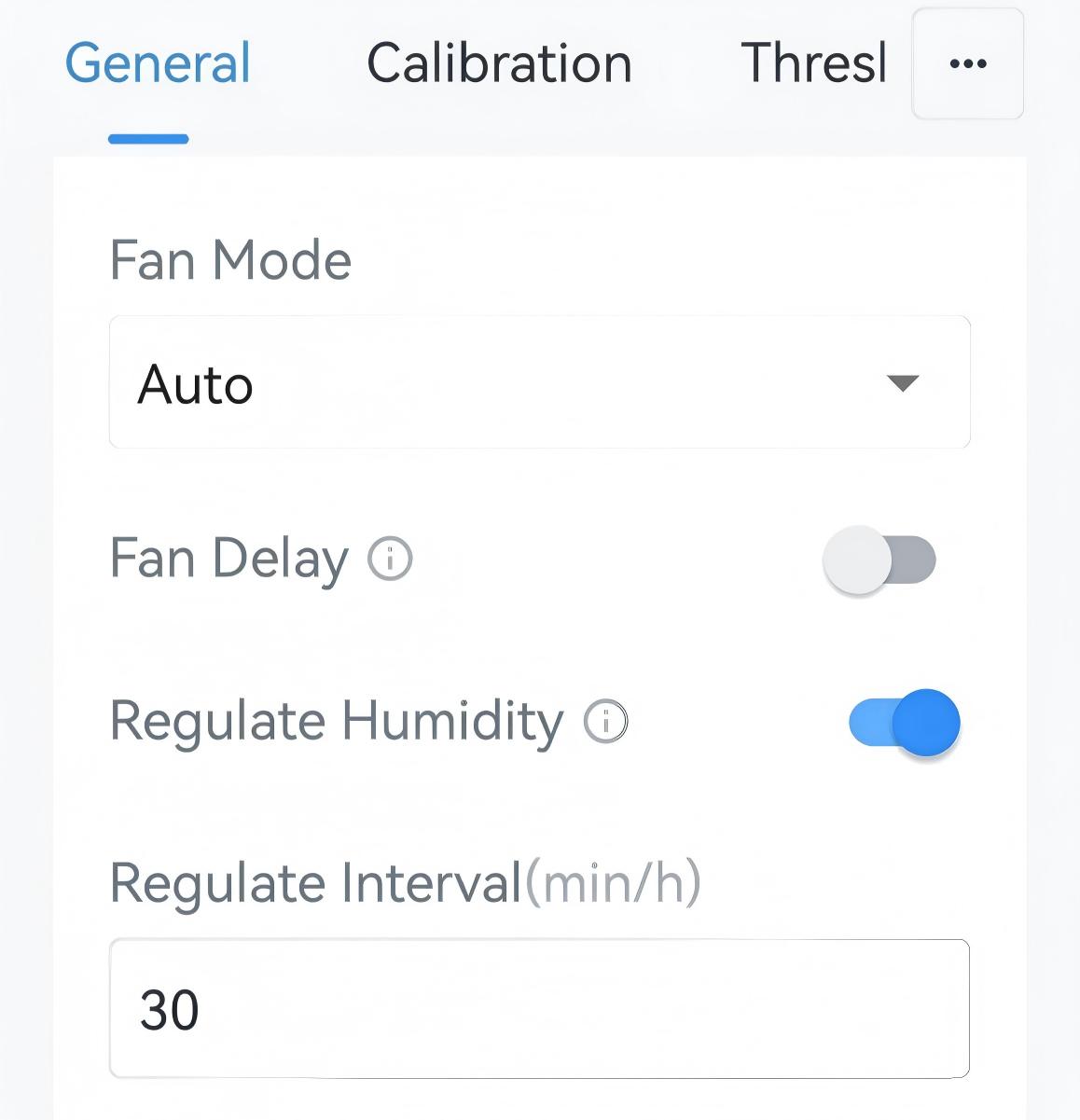
- (Optional) Enable Fan Delay and configure the time to delay the fan to close.
- Click Write in the lower right corner, and
put the NFC detection area of the phone close to the NFC antenna of device.
If the configuration succeeds, the following page is displayed.
- JSON Command: see Fan Mode Parameters
- BACnet: see Fan Mode Parameters
- Raw Hex Command: see Fan Mode Parameters
Temperature Control Stage Switch
When the thermostat connects to a HVAC system with multiple cooling or heating stage, it supports switching the stage automatically to achieve efficient control. Here introduces the parameters and features to achieve the automatic temperature control stage switching:
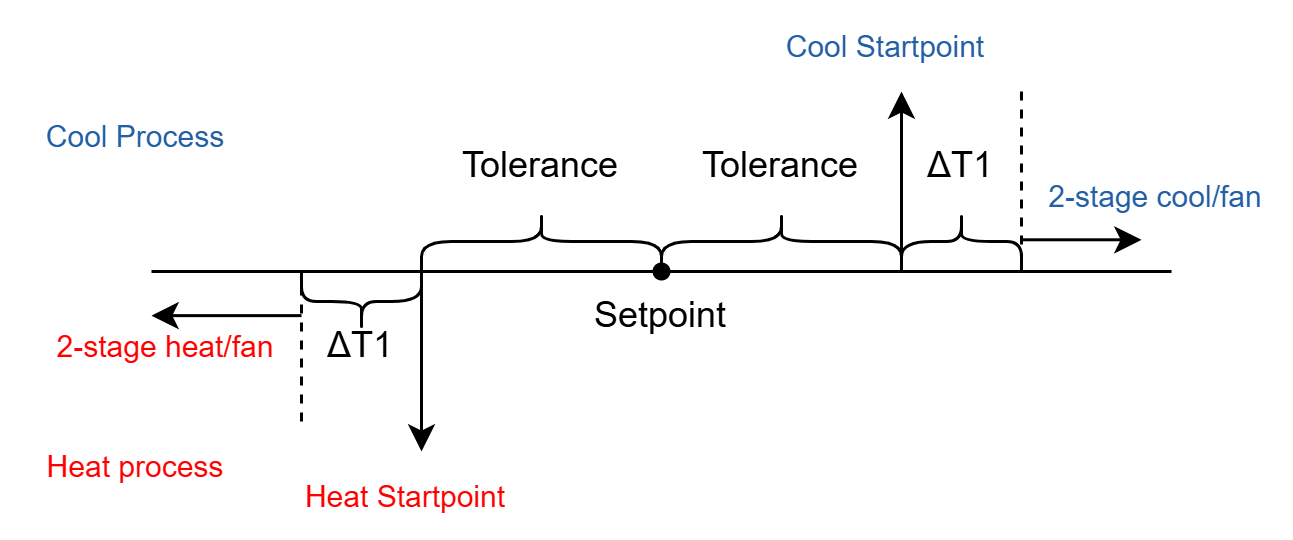
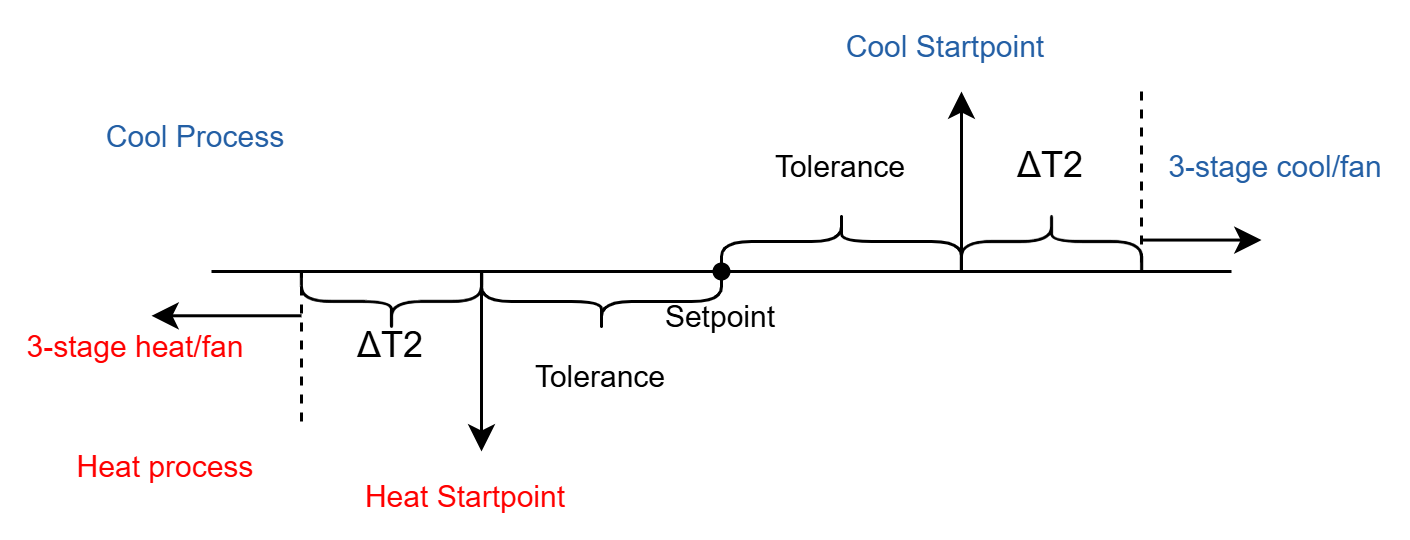
Setforward: When enabled, the thermostat automatically switches to the higher stage based on temperature delta values; when disabled, the thermostat uses only the initial stage determined by the temperature delta until the setpoint is reached. It's enabled by default.
Setback: When enabled, the thermostat automatically switches to the lower stage based on temperature delta values; when disabled, the thermostat uses only the initial stage determined by the temperature delta until the setpoint is reached. It's enabled by default.
Stage-up Switch: If the ambient temperature does not change by 1 °C within 5 minutes in the current stage, the thermostat will switch to a higher stage. The change value and the time can be adjusted as required.
- Configure by Downlink
-
- JSON Command: temperature_level_up_down_delta, temperature_up_down_enable, level_switch_settings
- BACnet: Temperature Control Delta
- Raw Hex Command: Temperature Delta, Setforward/Setback, Stage-up Switch
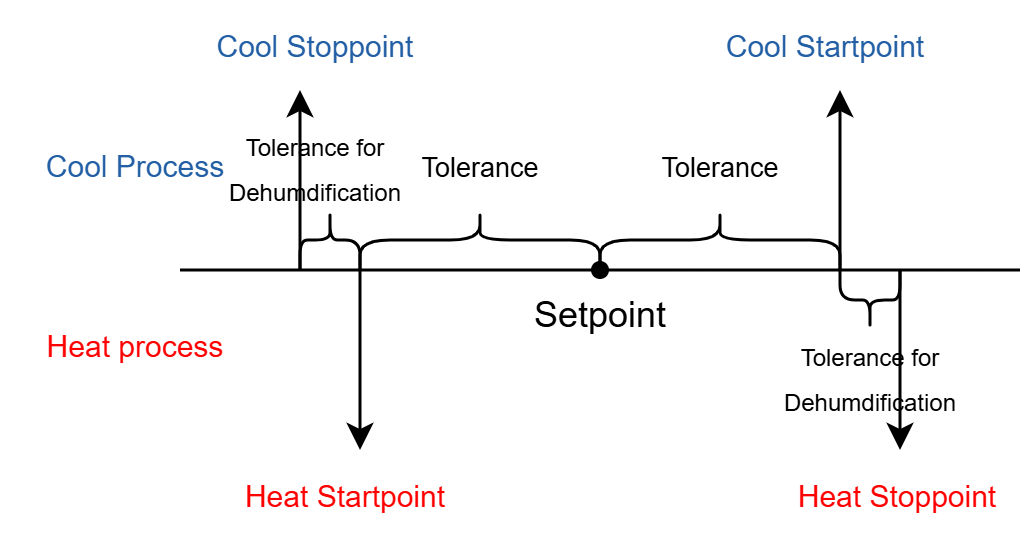
Temp. Control and Dehumidify
- On the homepage of ToolBox, click Setting to enter the Setting page.
- On the top bar, select Device tab.
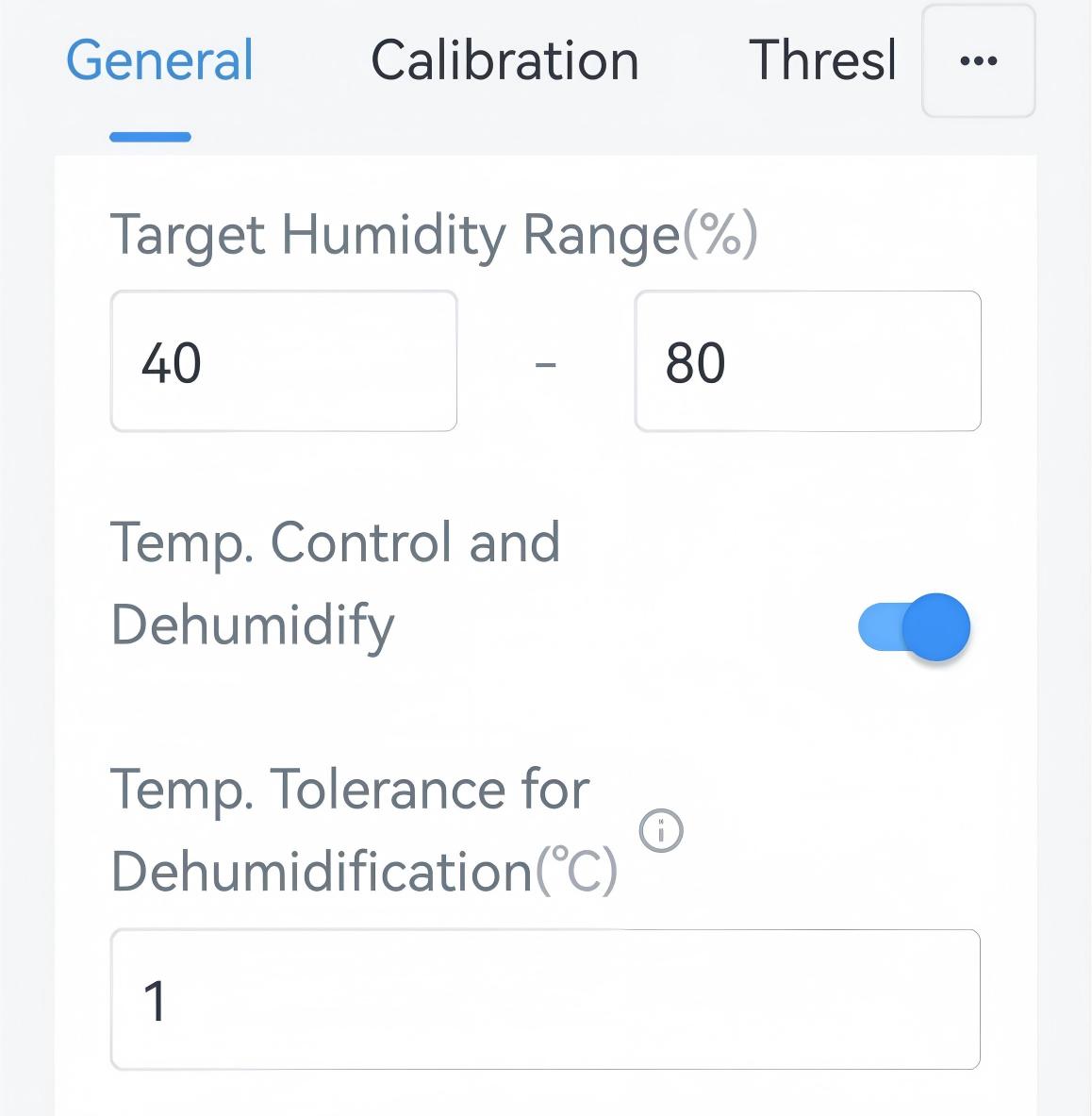
- On the General page, set the Target Humidity Range.
- Enable Temp. Control and Dehumidify and set the tolerance
value.
- Click Write in the lower right corner, and
put the NFC detection area of the phone close to the NFC antenna of device.
If the configuration succeeds, the following page is displayed.
- JSON Command: humidity_range, temperature_dehumidify
- Raw Hex Command: Target Humidity Range, Temp. Control and Dehumidify