Face Recognition
The VMS supports the integration of Face Recognition between AI Box and VMS Enterprise, allowing users to centrally manage AI Box and alarm events on VMS Enterprise.
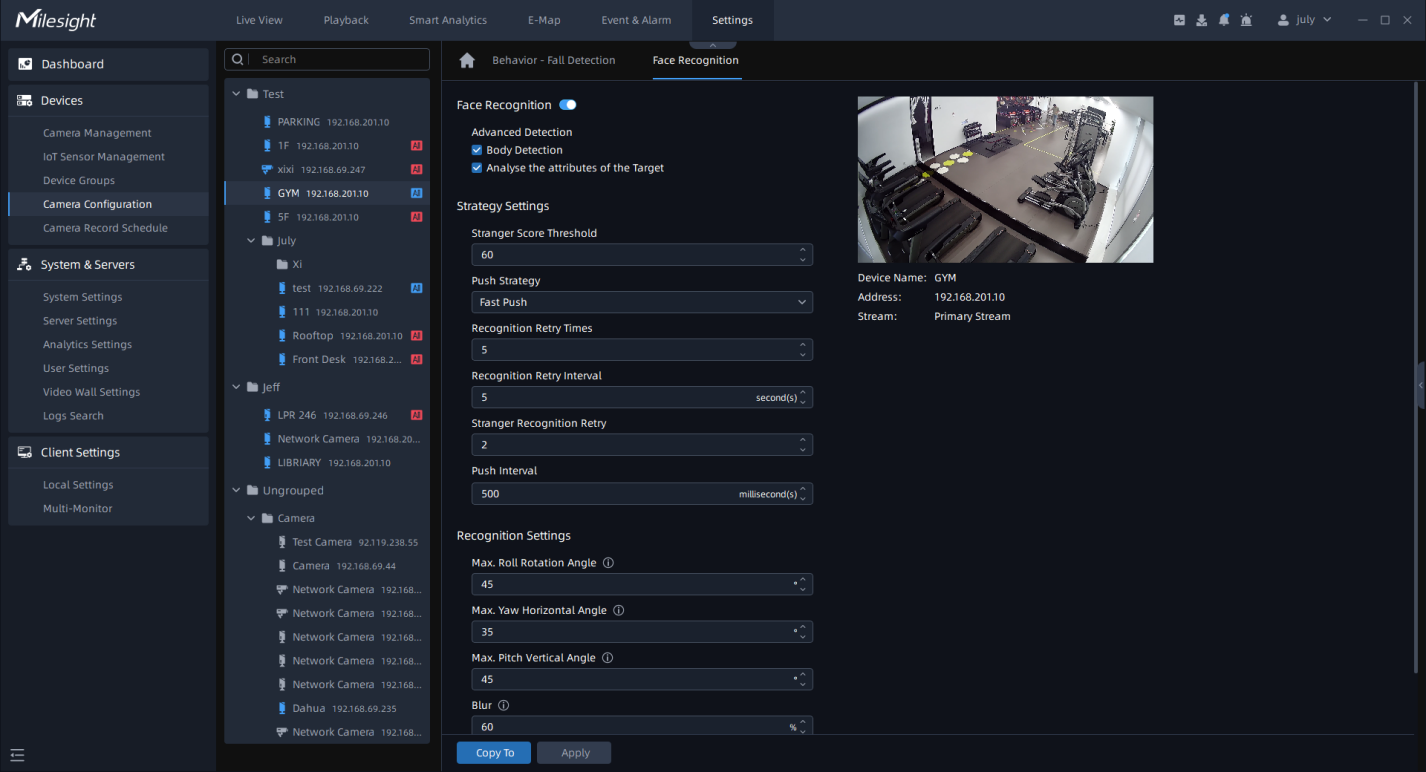
Face Recognition
Step1: Select the camera and enable Face Recognition. Check 'Body Detection' and 'Analyse the attributes of the Target' if you want to obtain more information about body attributes ;
- Stranger Score Threshold: Set the threshold, below which the target individual is labeled as a stranger, and above which it belongs to the Face Watch List.
- Push Strategy: If you set the 'Fast Push', it will push a face screenshot in the shortest time when the face is detected. Conversely, the 'Best Push' will push a face screenshot of best quality when the face is detected.
- Recognition Retry Times: Set this value, it determines the number of times, ranging from 0 to 5000, the system will attempt to recognize a face.
- Recognition Retry Interval: Set this value, it represents the time interval, ranging from 0 to 60 seconds, between successive retry attempts for facial recognition.
- Stranger Recognition Retry: Set this value, it allows for multiple retry attempts, ranging from 0 to 5, when detecting and identifying strangers during recognition.
-
Push Interval: Set this value, it determines the time interval between each push notification.
Step3: Set Recognition Settings based on the actual deployment environment and installation conditions of the camera.
- Max. Roll Rotation Angle: Set this value, it specifies the maximum acceptable angle, ranging from 0-180°, of roll rotation for accurate face recognition.
- Max. Yam Horizontal Angle: It sets the maximum allowable horizontal yam angle, ranging from 0-100°, for precise face recognition.
- Max. Pitch Vertical Angle: It determines the maximum allowable vertical pitch angle for accurate face recognition.
- Blur: It represents the level of blurriness, ranging from 0-100%, that is considered acceptable for face recognition.
- Min. Face: It defines the minimum size requirement, ranging from 5-380 pixels, for detecting and recognizing faces.
- Min Body: It sets the minimum size threshold, ranging from 5-380 pixels, for detecting and recognizing the human body.
Once you have configured the above parameters according to your needs, you can click
the to apply the settings. You can also click the
  to copy the settings to other channels.