Configure User Parameters
This section describes how to configure user parameters.
User Roles:
- Administrator: Has full system privileges with access to all webpage settings
- Viewer: Has access only to the Dashboard and Report pages
Modify Administrator's Parameters
- To change the login password of the device:
- In the User area, click
 in the Operation column. The Users modify dialog
box is displayed.
in the Operation column. The Users modify dialog
box is displayed.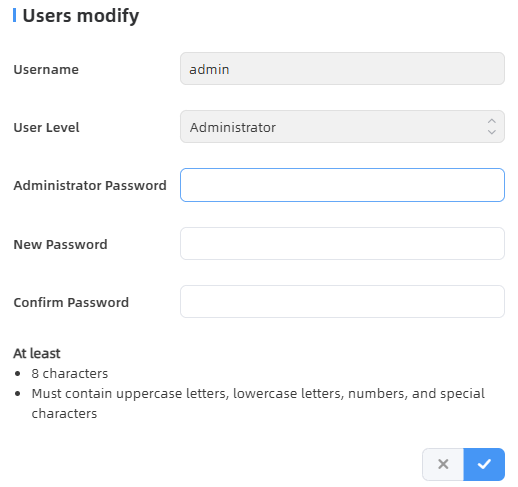
- In the Administrator Password area, enter the login password of the device.
- In the New Password area, enter a new password.
- In the Confirm Password area, enter the new password again.
- Click
 to save the
configuration.
to save the
configuration.
- In the User area, click
- To configure the security questions:
- Click
 . The Secure Question Settings
dialog box is displayed.
. The Secure Question Settings
dialog box is displayed.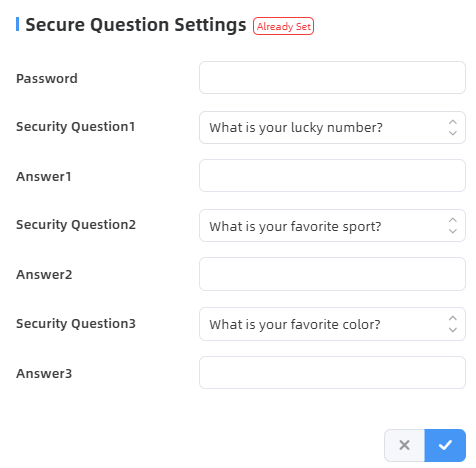
- Enter the login password and provide answers to the three security questions.
- Click to save the
configuration.
Troubleshooting: In case that you forget the password, you can click Forget Password on the login page to reset the password by answering the three security questions. - Click
Add a Viewer
- Click + Add User. The Add User dialog box is displayed.
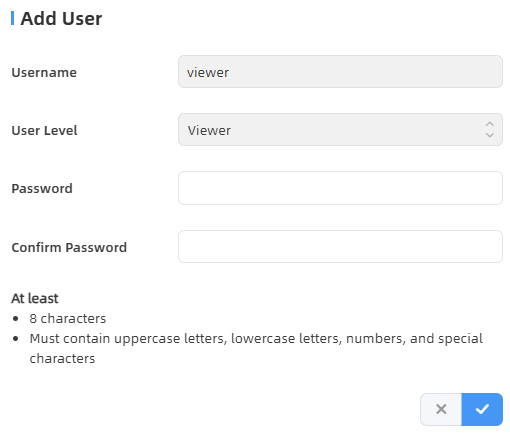
- In the Password area, enter a new password.
- In the Confirm Password area, enter the new password again.
- Click to save the configuration. The user is listed in
the Users area.
- (Optional) Click to change the password of the
viewer.