Object Left/Removed
Object Left can detect and prompt an alarm if an object is left in a pre-defined region. Object Removed can detect and prompt an alarm if an object is removed from a pre-defined region.
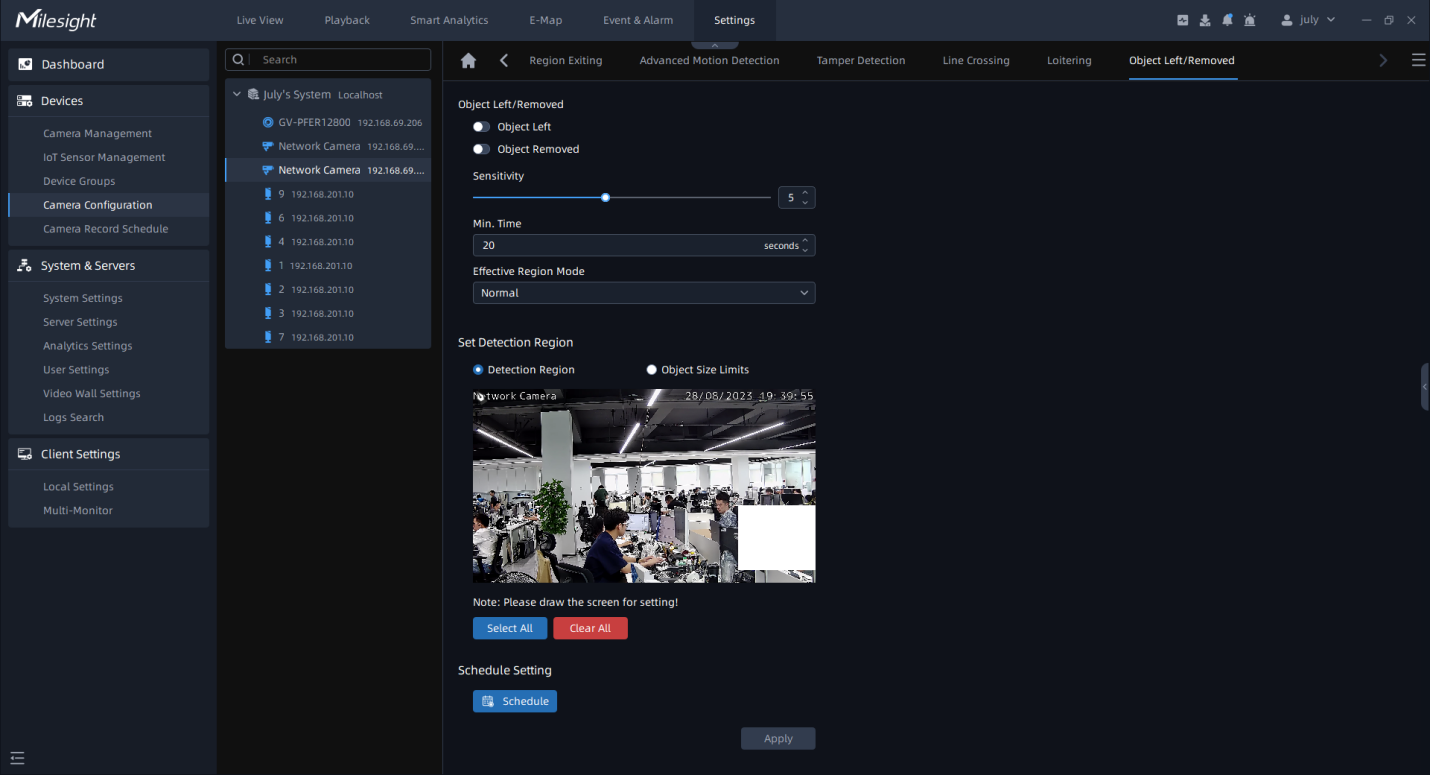
Step1: Enable Object Left or Object Removed (Or you can enable both features at the same time);
Step2: Set detecting sensitivity;
Step3: Set minimum time;
Step4: Set Effective Region Mode. If you choose Normal, it supports configuring the Detection region for the current area. If you choose Advanced (Only for PTZ series), it supports configuring the detection region for different PTZ presets (Only support Preset 1~4 so far);
Step5: Draw the detection region.
Step6: Set Object Size Limit.
- Minimum Size: Draw the screen or input pixel number to set the minimum size of the
detected object. When the object is smaller than this size, it will not be detected.
The default minimum size is 3*3.
- Maximum Size: Draw the screen or input pixel number to set the maximum size of the
detected object. When the object is larger than this size, it will not be detected.
The default maximum size is 320*240.
Step7: Set detection schedule, then click  to send the settings to camera to apply.
Step8: Click to send the settings to camera to apply.