VPN
This chapter introduces the VPN feature to ensure secure communication.
Overview
- On the left bar, select Network > VPN page.
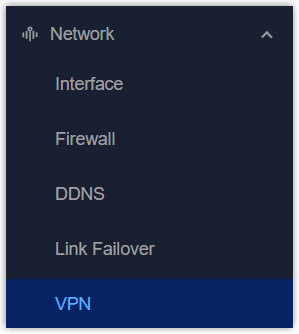
- On the top bar, select the corresponding VPN page and configure the VPN parameters. The parameters must match the peer side.
- Click Apply to save the settings.
- Navigate to Status page, select VPN from Other module to check VPN connection status.
OpenVPN Client
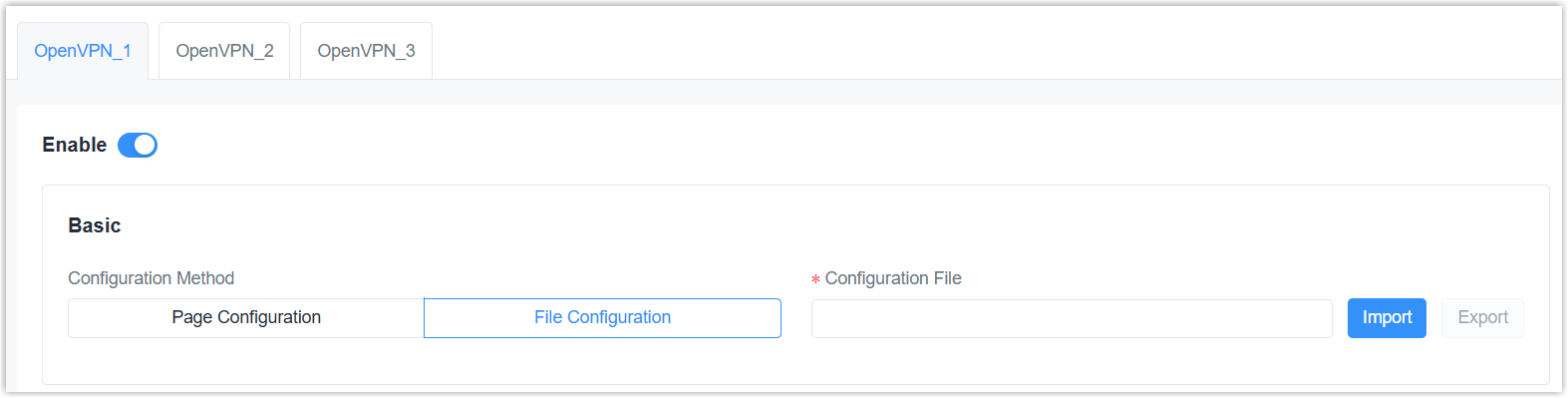
| Parameter | Description |
|---|---|
| Enable | Enable or disable this OpenVPN client. The gateway supports running at most 3 clients. |
| Configuration Method | Select the configuration
method. Page Configuration: Configure via webpage. |
| File Configuration | |
| Configuration File | Click Import to upload
the .ovpn configuration file. Please refer to
the client configuration file according to sample: client.conf |
| Page Configuration | |
| Protocol | Select the protocol from UDP and TCP to communicate with remote server. |
| Remote IP Address | The IP address or domain name of the OpenVPN server. |
| Port | The port number of the OpenVPN service. Make sure this port is open in the firewall. |
| Interface | Select the virtual interface type from Tap and Tun. Tun devices encapsulate IPv4 or IPv6 (OSI Layer 3) while Tap devices encapsulate Ethernet 802.3 (OSI Layer 2). |
| Authentication | Select the method to
authenticate the VPN network.
None: No need any authentication. |
| Local IP | When authentication type is None or Pre-shared, set the local virtual IP address. |
| Remote IP | When authentication type is None or Pre-shared and Interface is Tun, set the remote side virtual IP address. |
| Local Subnet Mask | When authentication type is None or Pre-shared and Interface is Tap, set the local subnet mask. |
| Global Traffic Forwarding | When authentication type includes X.509 cert, all data traffic will be sent out via this OpenVPN tunnel after enabled. |
| TLS Authentication | When authentication type
includes X.509 cert, disable or enable TLS authentication. After
enabled, it is necessary to import TA key file. Note: This option only supports
tls-auth. For
tls-crypt, please add option strings to
export option like this: tls-crypt
/etc/openvpn/openvpn_1-ta.key |
| NAT | Enable or disable NAT for this interface. |
| Compression | Enable or disable LZO compression algorithm. |
| Ping Interval | The interval to send heartbeat packet to check if the connection is alive. If this value is set on both server and client, the value pushed from the server will override the client value. |
| Ping Retry | If no packets are received from the server within this time, the gateway will restart the connection. If this value is set on both server and client, the value pushed from the server will override the client value. |
| Cipher | Select the cipher to encrypt data packets from None, AES-128-CBC, AES-192-CBC, and AES-256-CBC. |
| MTU | The maximum transmission unit of the packets passing this Tun/Tap virtual interface. |
| Max Frame Size | If the UDP data packet is over this size, it will be fragmented. |
| Verbose Level | Select log output verbosity level from Error (0), Warning (4), Notice (5), and Debug (6). |
| Expert Options | Add configuration option strings
and separate them with semicolons. The supported options can be
found here.
Example: auth SHA256; key direction 1 |
| Local Route | Click Add to add the local host subnet and netmask. |
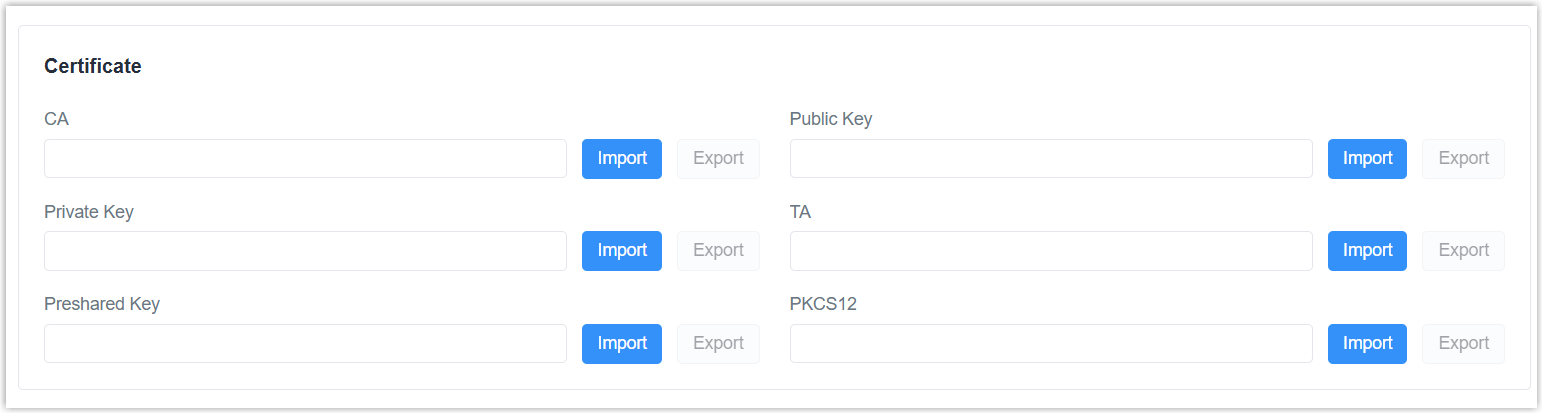
It is necessary to import certificates if using page configuration, or if the configuration file does not include certificate contents. Click here to get sample key files.
| Certificate Type | Description |
|---|---|
| CA | Import root CA certificate file (.crt) when authentication type includes X.509 cert. This must match the server. |
| Public Key | Import client certificate file (.crt) when authentication type includes X.509 cert. |
| Private Key | Import local client private key file (.key) when authentication type includes X.509 cert. |
| TA | Import ta key file (.key) when authentication type includes X.509 cert and TLS authentication is enabled. |
| Preshared Key | Import static key file (.key) when authentication type is Pre-shared. This must match the server. |
| PKCS12 | Import a PCKS (.p12) file including CA, Public Key and Private Key contents. This can simplify the file management and import process. |
OpenVPN Server

| Parameter | Description |
|---|---|
| Enable | Enable or disable this OpenVPN server. |
| Configuration Method | Select the configuration
method. Page Configuration: Configure via webpage. |
| File Configuration | |
| Configuration File | Click Import to upload
the .ovpn configuration file. Please refer to
the client configuration file according to sample: server.conf |
| Page Configuration | |
| Protocol | Select the protocol from UDP and TCP to communicate with remote clients. |
| Port | The port number of the OpenVPN service. Make sure this port is open in the firewall. |
| Listen IP | Enter the local hostname or IP address for bind. If left blank, OpenVPN server will bind to all interfaces. |
| Interface | Select the virtual interface type from Tap and Tun. Tun devices encapsulate IPv4 or IPv6 (OSI Layer 3) while Tap devices encapsulate Ethernet 802.3 (OSI Layer 2). |
| Authentication | Select the method to
authenticate the VPN network.
None: No need any authentication. |
| Local IP | When authentication type is None or Pre-shared, set the local virtual IP address. |
| Remote IP | When authentication type is None or Pre-shared and Interface is Tun, set the remote side virtual IP address. |
| Local Subnet Mask | When authentication type is None or Pre-shared and Interface is Tap, set the local subnet mask. |
| Client Subnet | When authentication type includes username/password or x.509 cert, define an IP address pool for openVPN clients. |
| Client Submask | Set the submask for the client subnet. |
| Renegotiation Interval | Renegotiate the data channel key after this interval. 0 means disabled. |
| Max Clients | The maximum number of client connections allowed. Range: 1-128 |
| Enable TLS Authentication | When authentication type
includes X.509 cert, disable or enable TLS authentication. After
enabled, it is necessary to import TA key file. Note: This option only supports
tls-auth. For
tls-crypt, please add option strings to
export option like this: tls-crypt
/etc/openvpn/openvpn_1-ta.key |
| Enable CRL | When authentication type includes username/password or x.509 cert, enable or disable CRL verify. |
| Enable Client to Client | When authentication type includes username/password or x.509 cert, enable or disable clients to communicate with each other. |
| Enable Dup Client | When authentication type includes username/password or x.509 cert, enable or disable clients to use the same certificates or username/password to connect to this server. |
| NAT | Enable or disable NAT for this interface. |
| Compression | Enable or disable LZO compression algorithm. |
| Ping Interval | The interval to send heartbeat packet to check if the connection is alive. If this value is set on both server and client, the value pushed from the server will override the client value. |
| Ping Retry | If no packets are received from the server within this time, the gateway will restart the connection. If this value is set on both server and client, the value pushed from the server will override the client value. |
| Cipher | Select the cipher to encrypt data packets from None, AES-128-CBC, AES-192-CBC, and AES-256-CBC. |
| MTU | The maximum transmission unit of the packets passing this Tun/Tap virtual interface. |
| Max Frame Size | If the UDP data packet is over this size, it will be fragmented. |
| Verbose Level | Select log output verbosity level from Error (0), Warning (4), Notice (5), and Debug (6). |
| Expert Options | Add configuration option strings
and separate them with semicolons. The supported options can be
found here.
Example: auth SHA256; key direction 1 |
| Account | Click Add to add username/password for OpenVPN client when authentication type includes username/password. |
| Local Route | Click Add to add the local host subnet and netmask. |
| Client Subnet | Click Add to add the subnet of OpenVPN Clients. The subnet name must be OpenVPN client certificate common name. |
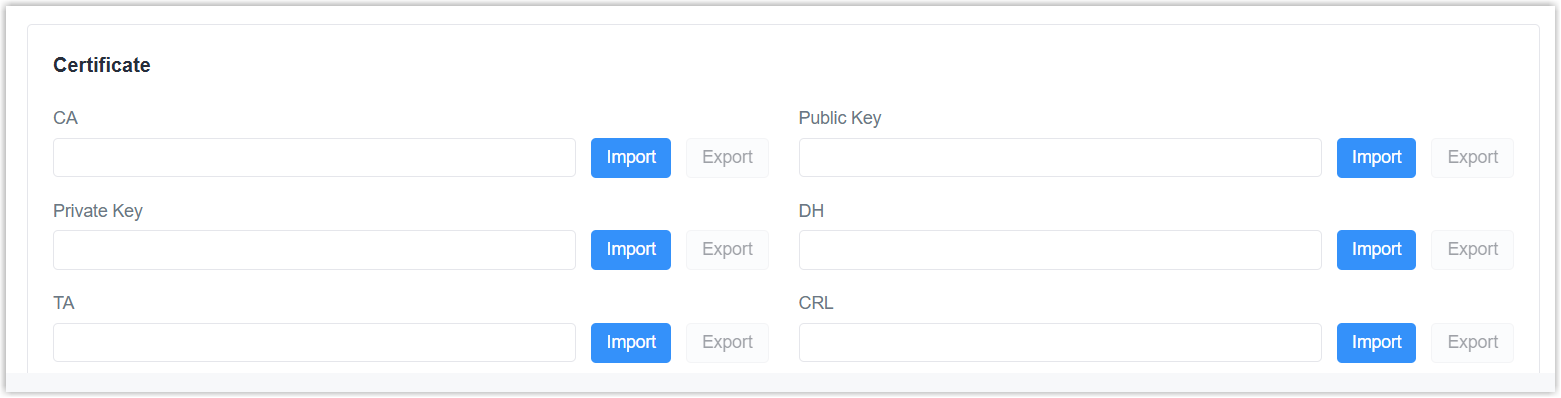
It is necessary to import certificates if using page configuration, or if the configuration file does not include certificate contents. Click here to get sample key files.
| Certificate Type | Description |
|---|---|
| CA | Import root CA certificate file (.crt) when authentication type includes X.509 cert. |
| Public Key | Import server certificate file (.crt) when authentication type includes X.509 cert. |
| Private Key | Import server private key file (.key) when authentication type includes X.509 cert. |
| DH | Import DH group file (.pem). |
| TA | Import ta key file (.key) when TLS authentication is enabled. |
| CRL | Import CRL file (.pem) when CRL verify is enabled. |
| Preshared Key | Import static key file (.key) when authentication type is Pre-shared. |
IPsec
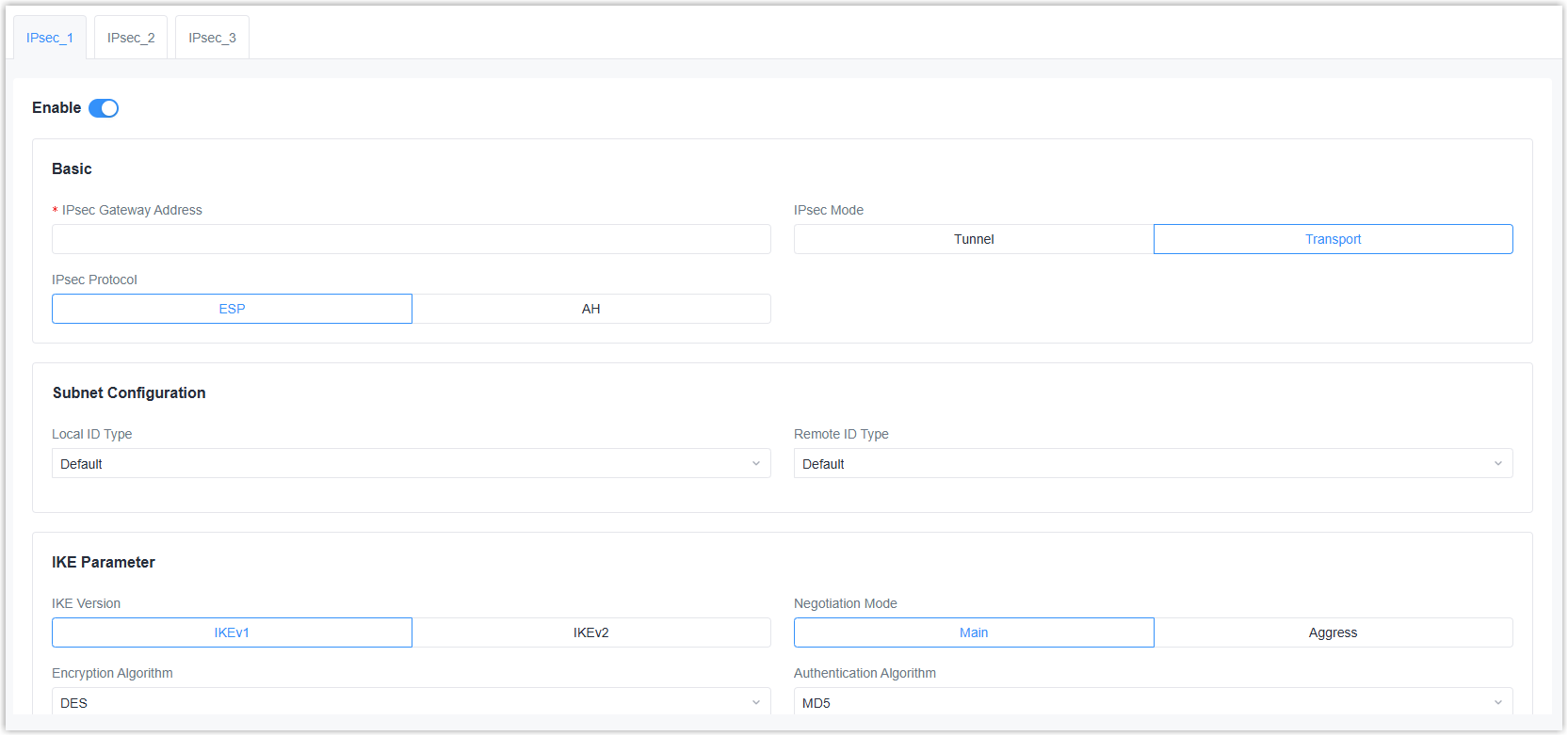
| Parameter | Description |
|---|---|
| Enable | Enable or disable IPsec tunnel. A maximum of 3 IPsec tunnels is allowed. |
| IPsec Gateway Address | The IP address or domain name of the peer side. |
| IPsec Mode | Select Tunnel or
Transport. Tunnel: It is most commonly used for configurations that need a secure connection between two different networks, separated by an intermediate untrusted network (like the Internet). |
| IPsec Protocol | Select ESP or AH. |
| Subnet Configuration | |
| Local ID Type | Select the identifier type to
send to remote
peer. Default: None |
| Remote ID Type | Select the identifier type that
is the same as remote peer local
ID. Default: None |
| Local Subnet | When IPsec mode is Tunnel, set the local LAN subnet. |
| Local Subnet Mask | When IPsec mode is Tunnel, set the local LAN subnet mask. |
| Remote Subnet | When IPsec mode is Tunnel, set the remote LAN subnet. |
| Remote Subnet Mask | When IPsec mode is Tunnel, set the remote LAN subnet mask. |
| IKE Parameter | |
| IKE Version | Select IKEv1 or IKEv2. |
| Negotiation Mode | When using IKEv1, select Main or Aggressive. |
| Encryption Algorithm | Select from AES128, AES192, and AES256. |
| Authentication Algorithm | Select MD5 or SHA1. |
| DH Group | Select from MODP768-1, MODP1024-2 or MODP1536-5. |
| Local Authentication Type | Select PSK or CA.
PSK: Use pre-shared key to complete the authentication. It requires entering the local secret key value the same as peer. CA: Use certificate to complete the authentication. After selecting, it is necessary to import CA certificate, client certificate and private key to corresponding fields. |
| Remote Authentication Type | When using IKEv2, select PSK or
CA.
PSK: Use pre-shared key to complete the authentication. It requires entering the remote secret key value. CA: Use certificate to complete the authentication. After selecting, it is necessary to import server certificate to corresponding field. |
| Lifetime | The last time before IKE re-negotiation. |
| XAUTH | When using IKEv1, define XAUTH username and password to reply to an XAUTH request after XAUTH is enabled. |
| SA Parameter | |
| SA Algorithm | Select from AES128-SHA1, AES128-MD5, AES192-SHA1, AES192-MD5, AES256-SHA1, and AES256-MD5. |
| PFS Group | Select from NULL, MODP768-1, MODP1024-2 or MODP1536-5. |
| DPD Time Interval | The retry interval to send DPD requests. |
| DPD Timeout | When using IKEv1, set DPD timeout to detect the remote side fails. |
| Lifetime | The last time before SA re-negotiation. |
| IPsec Advanced | |
| VPN Over IPsec Type | Select whether to enable L2TP over IPsec. If L2TP is selected, it is necessary to select the L2TP tunnel. |
| Enable Compression | Enable or disable to compress the head of IP packets. |
| Certificate | |
| CA | Import root CA certificate file (.crt) when local authentication type is CA. |
| Client Certificate | Import client certificate file (.crt) when local authentication type is CA. |
| Server Certificate | Import server certificate file (.crt) when remote authentication type is CA. |
| Private Key | Import local client private key file (.key) when local authentication type is CA. |
| CRL | Import Certificate Revocation List as required. |
WireGuard
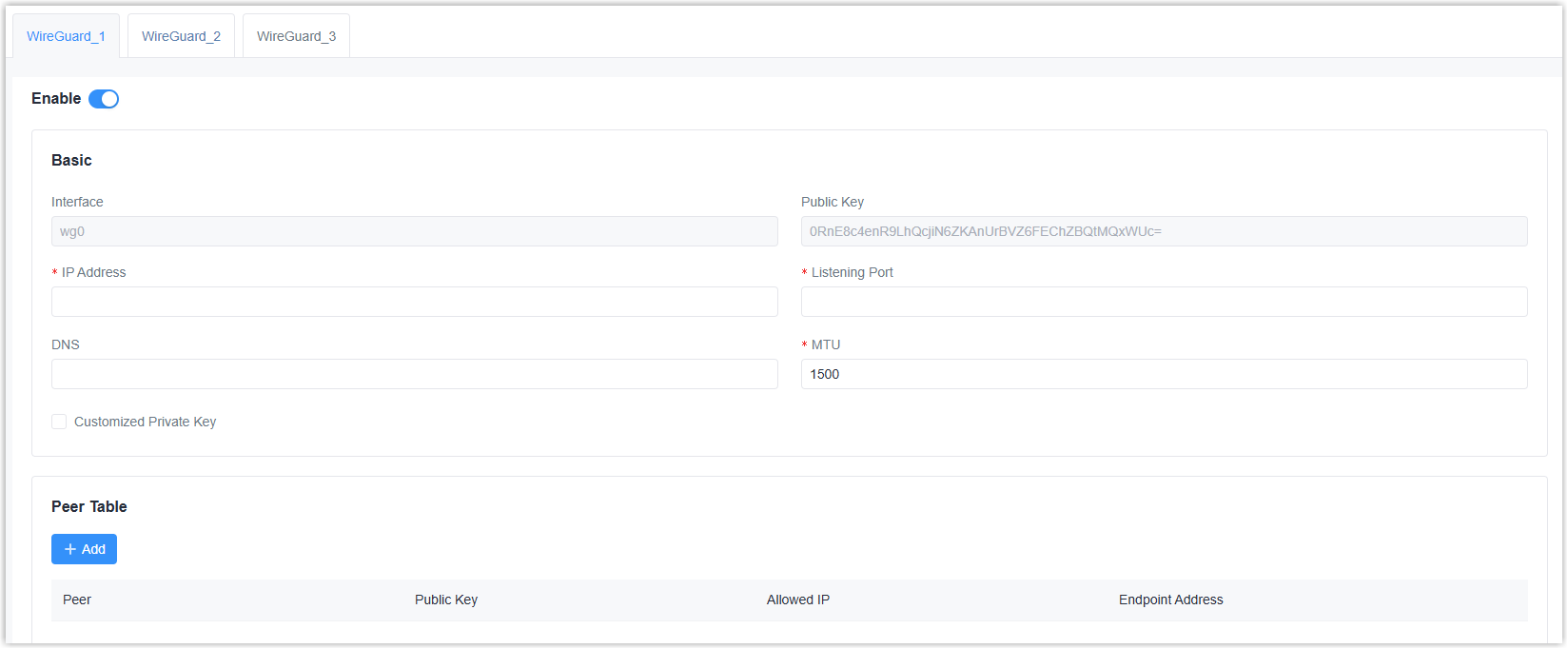
| Parameter | Description |
|---|---|
| Enable | Enable or disable WireGuard interface. A maximum of 3 WireGuard interfaces is allowed. |
| Interface | Display the WireGuard interface name. |
| Public Key | Display the public key generated by the private key. |
| IP Address | The local virtual IP address and netmask. Example: 10.8.0.2/24 |
| Listening Port | The port to send or receive WireGuard packets. The port numbers of different WireGuard interfaces should be different. |
| DNS | The DNS server address of this WireGuard interface. If left blank, the device will use DNS server address of common network interfaces (WAN, cellular, etc.). |
| MTU | The maximum transmission unit of this WireGuard interface. |
| Customized Private Key | Enable or disable to customize the private key of this WireGuard interface. If disabled, the client will use the private key generated by this device. |
| Peer Table | Click +Add to WireGuard
peers of this WireGuard interface.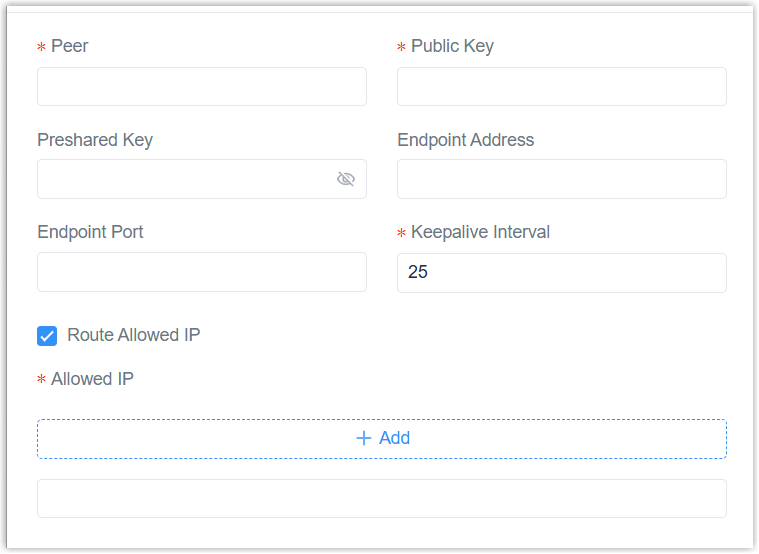 Peer: A unique peer name. |
L2TP
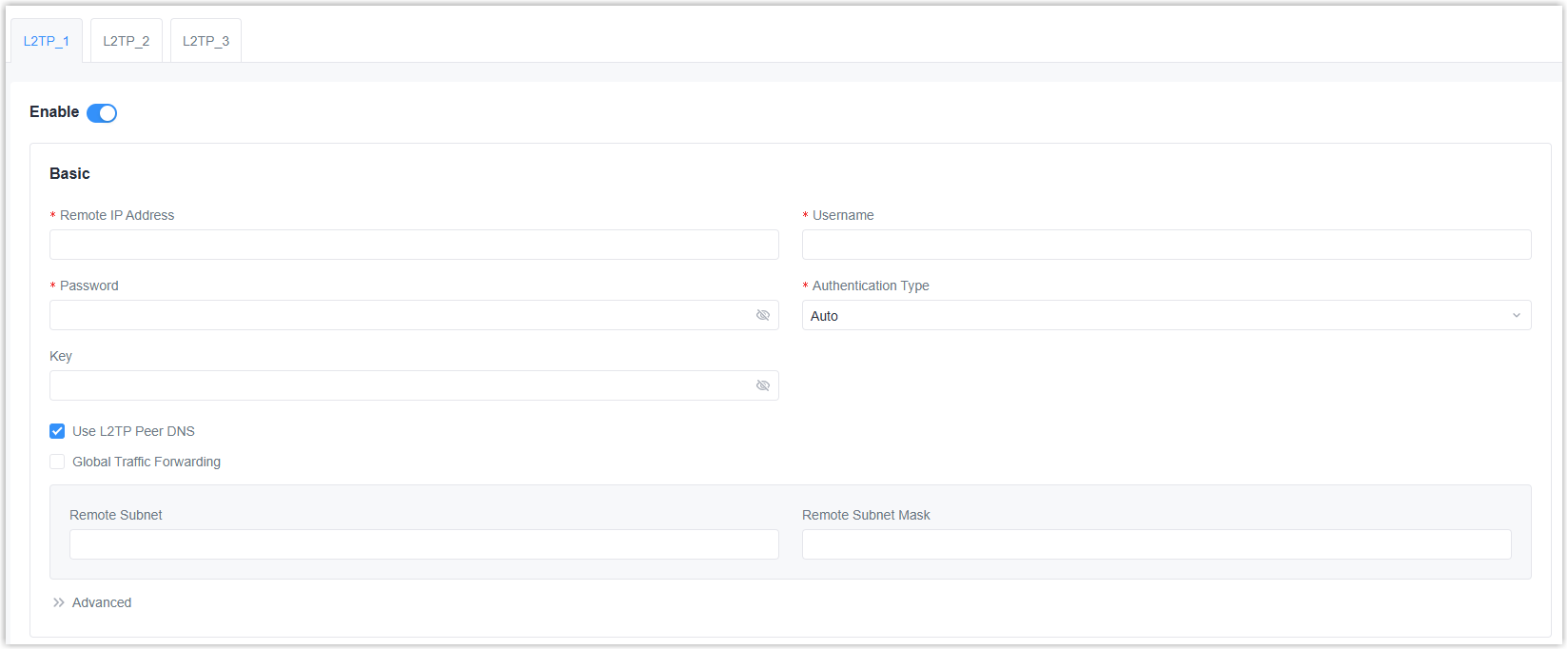
| Parameter | Description |
|---|---|
| Enable | Enable or disable L2TP client. A maximum of 3 L2TP clients is allowed. |
| Remote IP Address | The IP address or domain name of the L2TP server. |
| Username | Username used for authentication to the L2TP server. |
| Password | Password used for authentication to the L2TP server. |
| Authentication Type | Select from Auto, PAP, CHAP, MS-CHAPv1, and MS-CHAPv2. |
| Key | The key used for L2TP tunnel authentication. |
| Use L2TP Peer DNS | Enable or disable to use the DNS address of peer L2TP server. |
| Global Traffic Forwarding | All data traffic will be sent out via this VPN tunnel after enabled. If disabled, it is necessary to set the remote subnet and mask. |
| Advanced | |
| Local IP Address | The local tunnel IP address of this client. If left blank, the client will obtain the tunnel IP address from the server. |
| Peer IP Address | The peer tunnel IP address. |
| Asyncmap Value | Define which ASCII control characters should be escaped on an asynchronous link. Range: 0-ffffffff. |
| MRU | The maximum receiving unit of the packets passing this L2TP interface. |
| MTU | The maximum transmission unit of the packets passing this L2TP interface. |
| Link Detection Interval | The interval to send heartbeat packet to check if the connection is alive. |
| Max Retries Times | If no packets are received from the server within this time, the gateway will restart the connection. |
| Expert Options | Add configuration option strings and separate them with semicolons. |
| Enable NAT | Enable or disable NAT for this interface. |
| Enable MPPE | Enable or disable MPPE encryption. |
| Address/Control Compression | Enable or disable Address and Control Field Compression (ACFC). |
| Protocol Field Compression | Enable or disable protocol Field Compression (PFC). |
PPTP
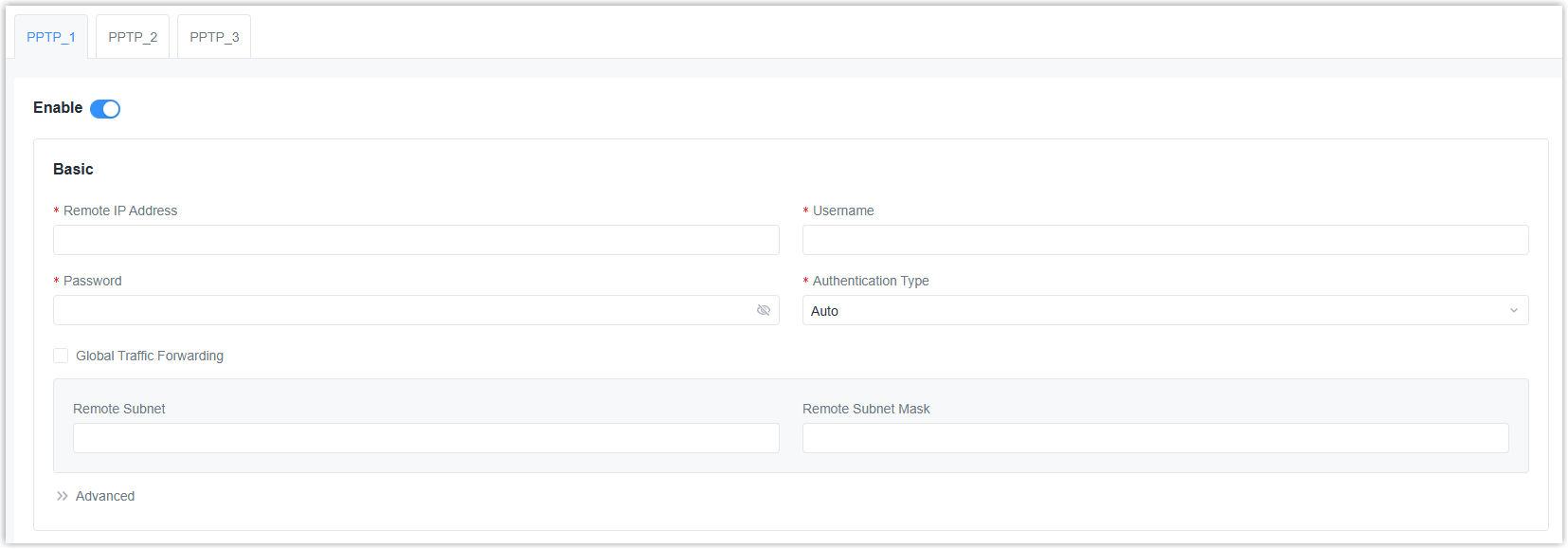
| Parameter | Description |
|---|---|
| Enable | Enable or disable PPTP client. A maximum of 3 PPTP clients is allowed. |
| Remote IP Address | The IP address or domain name of the PPTP server. |
| Username | Username used for authentication to the PPTP server. |
| Password | Password used for authentication to the PPTP server. |
| Authentication Type | Select from Auto, PAP, CHAP, MS-CHAPv1, and MS-CHAPv2. |
| Global Traffic Forwarding | All data traffic will be sent out via this VPN tunnel after enabled. If disabled, it is necessary to set the remote subnet and mask. |
| Advanced | |
| Local IP Address | The local tunnel IP address of this client. If left blank, the client will obtain the tunnel IP address from the server. |
| Peer IP Address | The peer tunnel IP address. |
| Asyncmap Value | Define which ASCII control characters should be escaped on an asynchronous link. Range: 0-ffffffff. |
| MRU | The maximum receiving unit of the packets passing this PPTP interface. |
| MTU | The maximum transmission unit of the packets passing this PPTP interface. |
| Link Detection Interval | The interval to send heartbeat packet to check if the connection is alive. |
| Max Retries Times | If no packets are received from the server within this time, the gateway will restart the connection. |
| Expert Options | Add configuration option strings and separate them with semicolons. |
| Enable NAT | Enable or disable NAT for this interface. |
| Enable MPPE | Enable or disable MPPE encryption. |
| Address/Control Compression | Enable or disable Address and Control Field Compression (ACFC). |
| Protocol Field Compression | Enable or disable protocol Field Compression (PFC). |