Ethernet
The device has two Ethernet ports. This chapter describes how to configure these Ethernet ports.
Steps
- On the left bar, select Network > Interface
page.
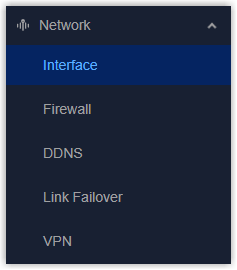
- On the top bar, select Ethernet tab.
- Select the port mode as Standalone mode or Bridge
Mode.
Standalone Mode: Each Ethernet port can work as either WAN port or LAN port.
Bridge Mode: The two Ethernet ports are bridged together for transparent forwarding. - Configure the Ethernet parameters according to the port mode.
- Enable or disable Ethernet ports in Interface Settings.
- Click Apply to save the settings.
- After connecting the Ethernet ports to devices, check the screen or go to Status page to check connection status of Ethernet ports.
- Configure Link Failover settings to enable ETH interface or bridge interface as network link.
Standalone Mode - WAN Settings
When the Ethernet port works as WAN port to connects to the external network
(Internet). It supports 3 connection types:
- Static IP AddressAssign a static IP address to this WAN port manually.
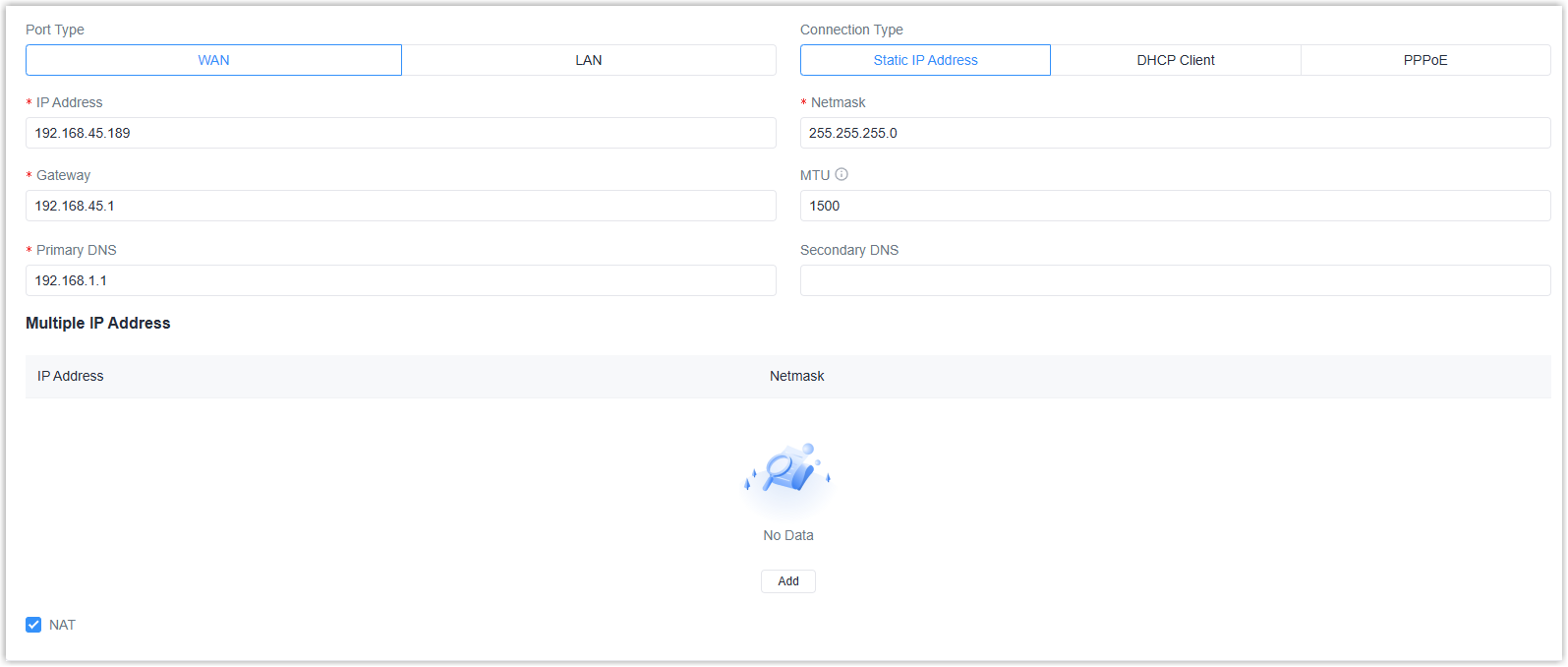
Parameter Description IP Address The IPv4 address of this interface. The address must be in the same subnet as the gateway address. Netmask The IPv4 netmask of this interface. Gateway The IPv4 gateway address of this WAN port. MTU The maximum transmission unit of the packets passing this interface. Primary DNS The primary DNS server address. Secondary DNS The secondary DNS server address if the primary DNS server does not work. Multiple IP Address Click Add to add extra IP address and netmask for this interface. NAT Enable or disable NAT for this interface. - DHCP ClientObtain IPv4 address automatically from DHCP server.
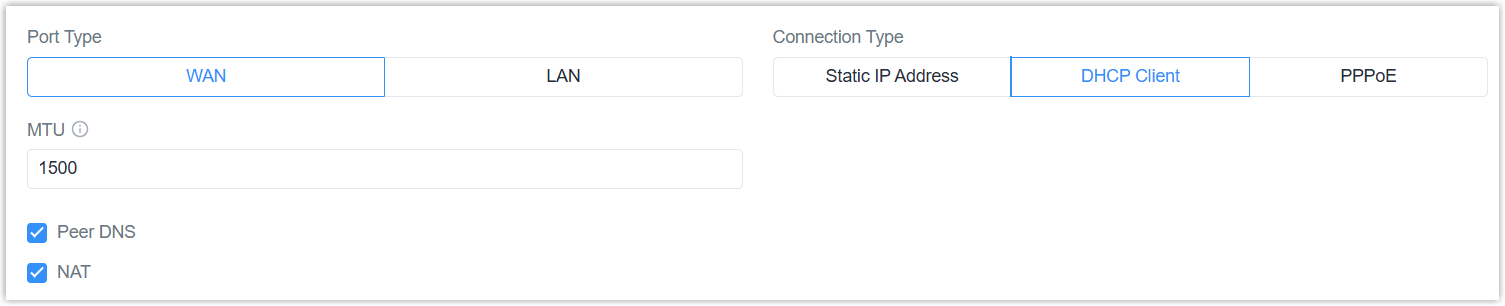
Parameter Description MTU The maximum transmission unit of the packets passing this interface. Peer DNS Use the DNS server address of the peer. If disabled, it is necessary to configure the primary DNS server and secondary DNS sever manually. NAT Enable or disable NAT for this interface. - PPPoESet up a PPP (Point-to-Point Protocol) connection over the Ethernet port to receive the IP address.
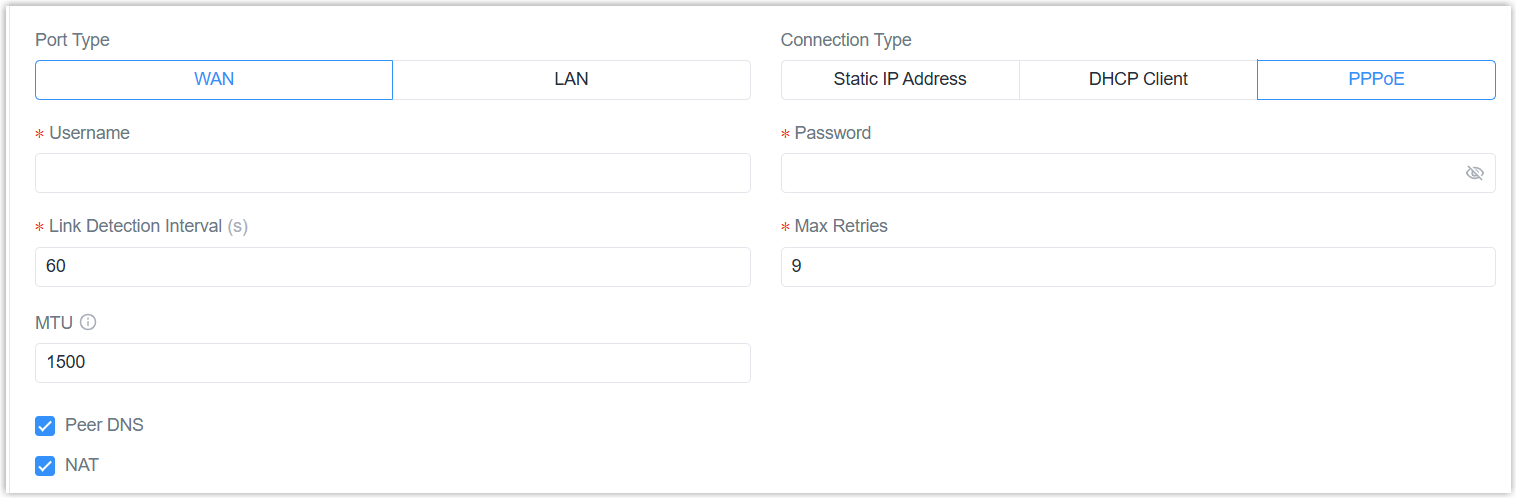
Parameter Description Username The username for PAP/CHAP authentication. Password The password for PAP/CHAP authentication. Link Detection Interval The interval to send heartbeat packets to detect the link status. Max Retries The maximum retry times if the dialing is failed. MTU The maximum transmission unit of the packets passing this interface. The actual MTU value is the configured value minus 8. Peer DNS Use the DNS server address of the peer. If disabled, it is necessary to configure the primary DNS server and secondary DNS sever manually. NAT Enable or disable NAT for this interface.
Standalone Mode - LAN Settings
When the Ethernet port works as LAN port to connect internal devices for local
interconnection and data sharing.
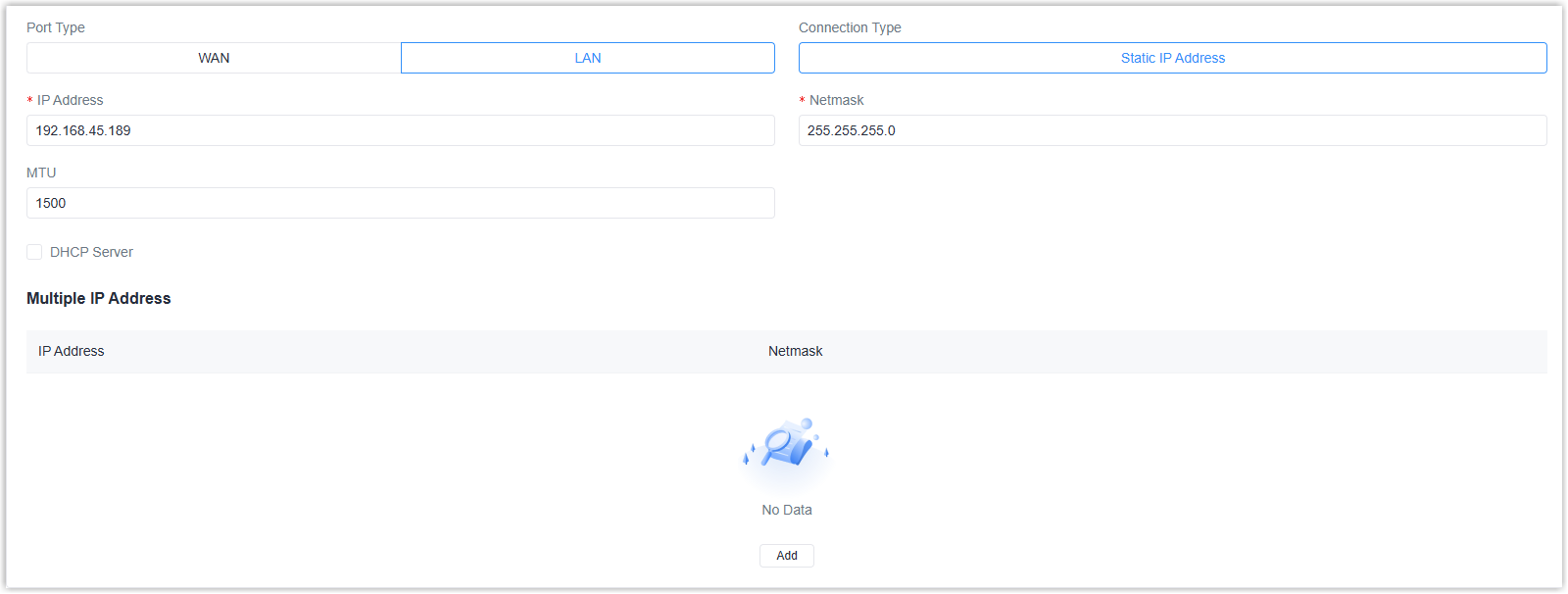
| Parameter | Description |
|---|---|
| IP Address | The IPv4 address of this interface. |
| Netmask | The IPv4 netmask of this interface. |
| MTU | The maximum transmission unit of the packets passing this interface. |
| Multiple IP Address | Click Add to add extra IP address and netmask for this interface. |
| DHCP Server | |
| DHCP Server | Enable the DHCP server to assign IP address to connected client devices automatically. If disabled, the client devices are required to configure their own IP addresses. |
| Start Address | Set the start IP address of the IP range to assign IP addresses. |
| End Address | Set the end IP address of the IP range to assign IP addresses. |
| Lease Time | Set the lease time during which the client can use the IP address from the DHCP server. After this time, the client has to request a new lease. |
| Primary DNS | The primary DNS server address. |
| Secondary DNS | The secondary DNS server address if the primary DNS server does not work. |
| Windows Name Server | Define the Windows Internet Naming Service obtained by DHCP clients from the DHCP server. Generally, you can leave it blank. |
| MAC Binding | Click Add to bind the specific IP addresses to specific clients by client MAC addresses. |
Bridge Mode Settings
Both Ethernet ports share the same configuration and support 2 connection types:
- Static IP Address
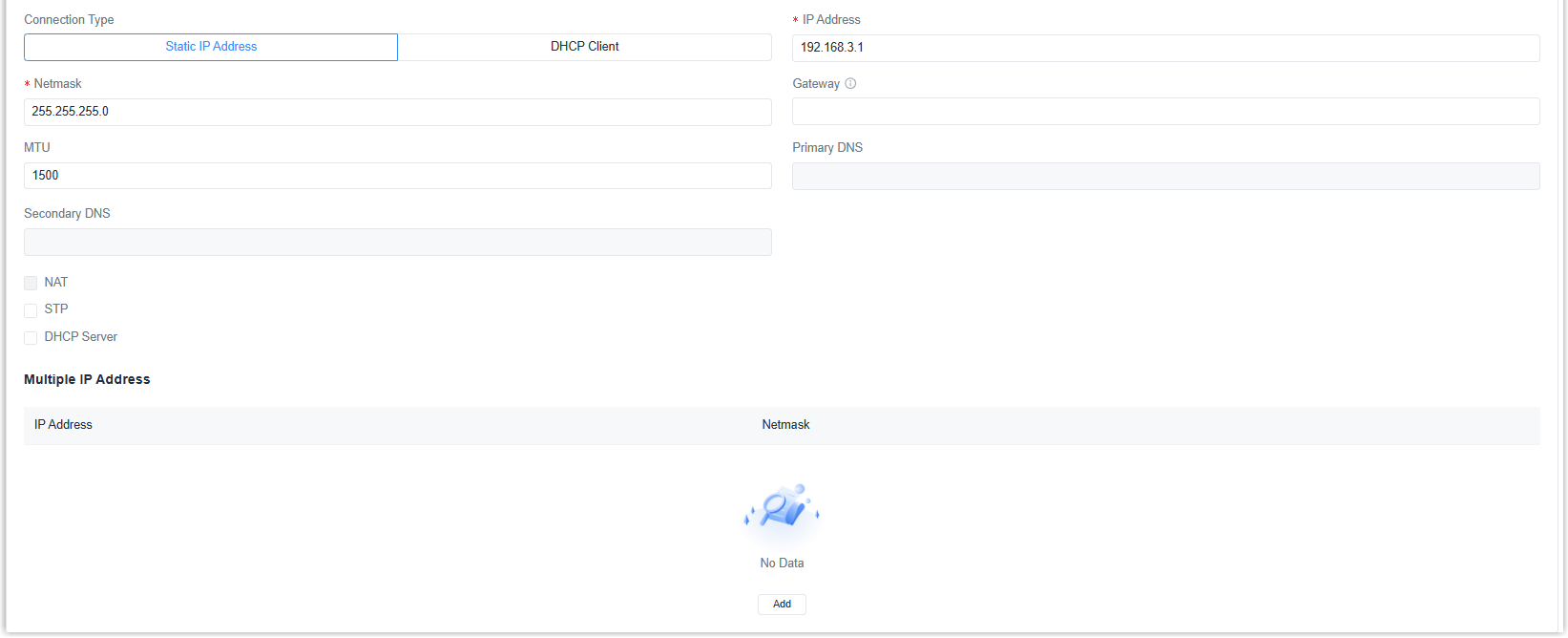
Parameter Description IP Address The IPv4 address of this interface. The address must be in the same subnet as the gateway address when it needs to connect to the external network. Netmask The IPv4 netmask of this interface. Gateway Enter the IPv4 gateway address of this interface when it needs to connect to the external network. MTU The maximum transmission unit of the packets passing this interface. Primary DNS When gateway address is typed, set the primary DNS server address. Secondary DNS When gateway address is typed, set he secondary DNS server address. NAT When gateway address is typed, enable or disable NAT for this interface. STP Disable or enable STP for this interface. Multiple IP Address Click Add to add extra IP address and netmask for this interface. DHCP Server DHCP Server Enable the DHCP server to assign IP address to connected client devices automatically. If disabled, the client devices are required to configure their own IP addresses. Start Address Set the start IP address of the IP range to assign IP addresses. End Address Set the end IP address of the IP range to assign IP addresses. Lease Time Set the lease time during which the client can use the IP address from the DHCP server. After this time, the client has to request a new lease. Primary DNS The primary DNS server address. Secondary DNS The secondary DNS server address if the primary DNS server does not work. Windows Name Server Define the Windows Internet Naming Service obtained by DHCP clients from the DHCP server. Generally, you can leave it blank. MAC Binding Click Add to bind the specific IP addresses to specific clients by client MAC addresses. - DHCP Client
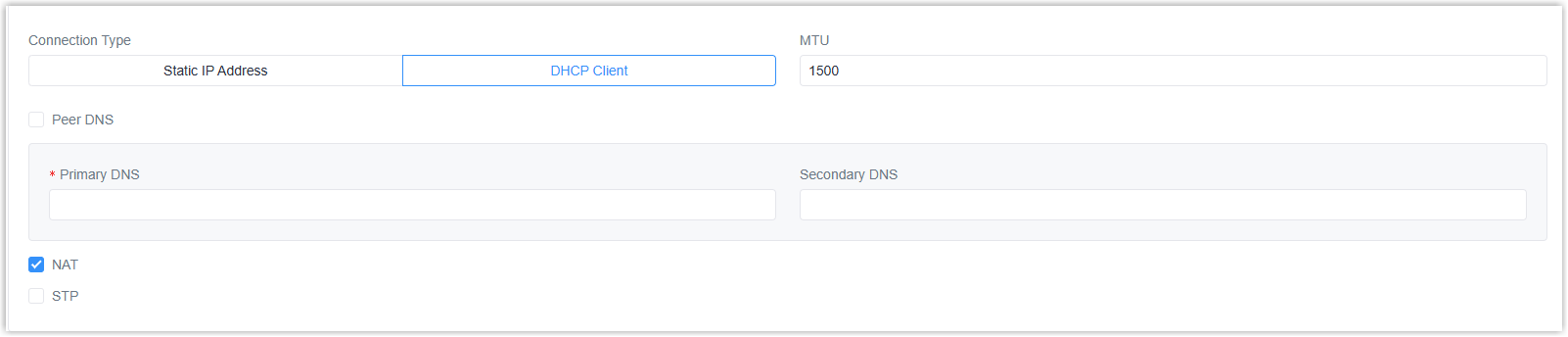
Parameter Description MTU The maximum transmission unit of the packets passing this interface. Peer DNS Use the DNS server address of the peer. If disabled, it is necessary to configure the primary DNS server and secondary DNS sever manually. NAT Enable or disable NAT for this interface. STP Disable or enable STP for this interface.
Interface Settings
Enable or disable the ETH interfaces as required.
