Link Backup
The gateway supports setting the priority of the available network links and using ping detection to determine whether a link is available. This chapter is used to configure the primary and secondary network links and the ping detection settings.
- On the left bar, select Network page.
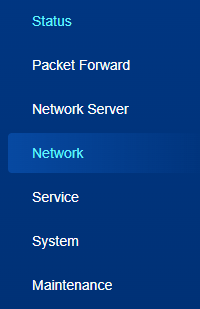
- On the top bar, select Link Backup tab.
- Configure the link backup parameters as required.
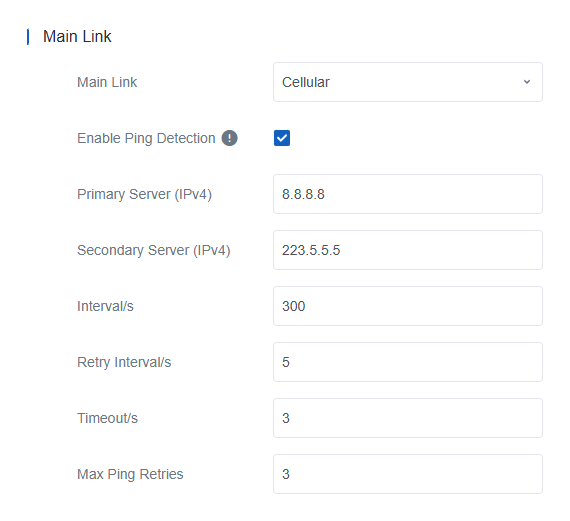
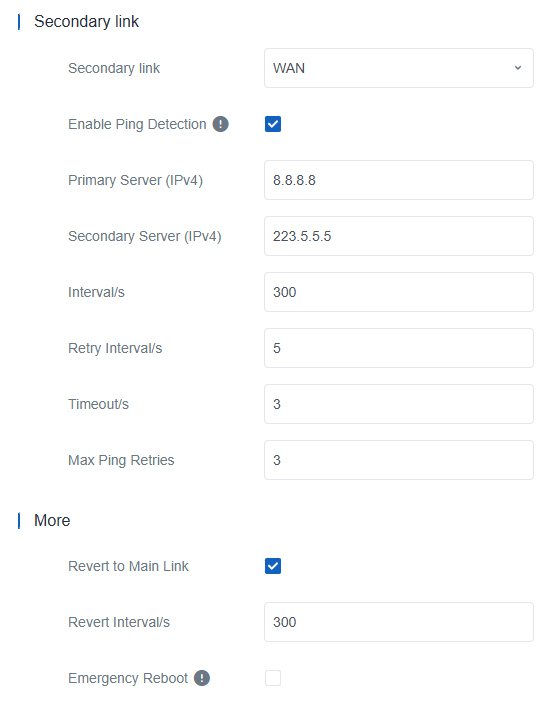
Parameter Description Main Link Select from WAN, Cellular and WLAN. Secondary Link Select from WAN, Cellular, WLAN, or None, depending on the main link. Enable Ping Detection When enabled, the gateway periodically sends ICMP packets to the corresponding servers to detect the connection. Note: It is suggested to disable this option if the gateway is connected to a private, non-Internet network.Primary Server (IPv4) The IPv4 server address that the gateway pings to determine whether the connection is still available. Secondary Server (IPv4) The IPv4 server address that the gateway tries to ping if the primary server is unavailable. Interval The time interval between two ping attempts. Retry Interval The interval to retry the ping if the previous ping reaches the timeout and does not reach the max retry times. Timeout The maximum time that the gateway waits for a ping response. If no response is received within this time, the ping request is considered failed. Max Ping Retries The number of times that the gateway retries sending a ping request before determining that the connection has failed. More Revert to Main Link When the main link connection recovers, revert to the main link. Revert interval Specify the maximum time to wait before switching back to the main link. A value of 0 disables this function. Emergency Reboot Enable the gateway to reboot if no network link is available. - Click Save & Apply to save the settings.