Configure Deployment Parameter
This section describes how to configure deployment parameters.
Steps:
-
In the main page, click Rule from the left navigation tree.
-
In the Deployment Parameters area on the right, configure the following parameters as needed.
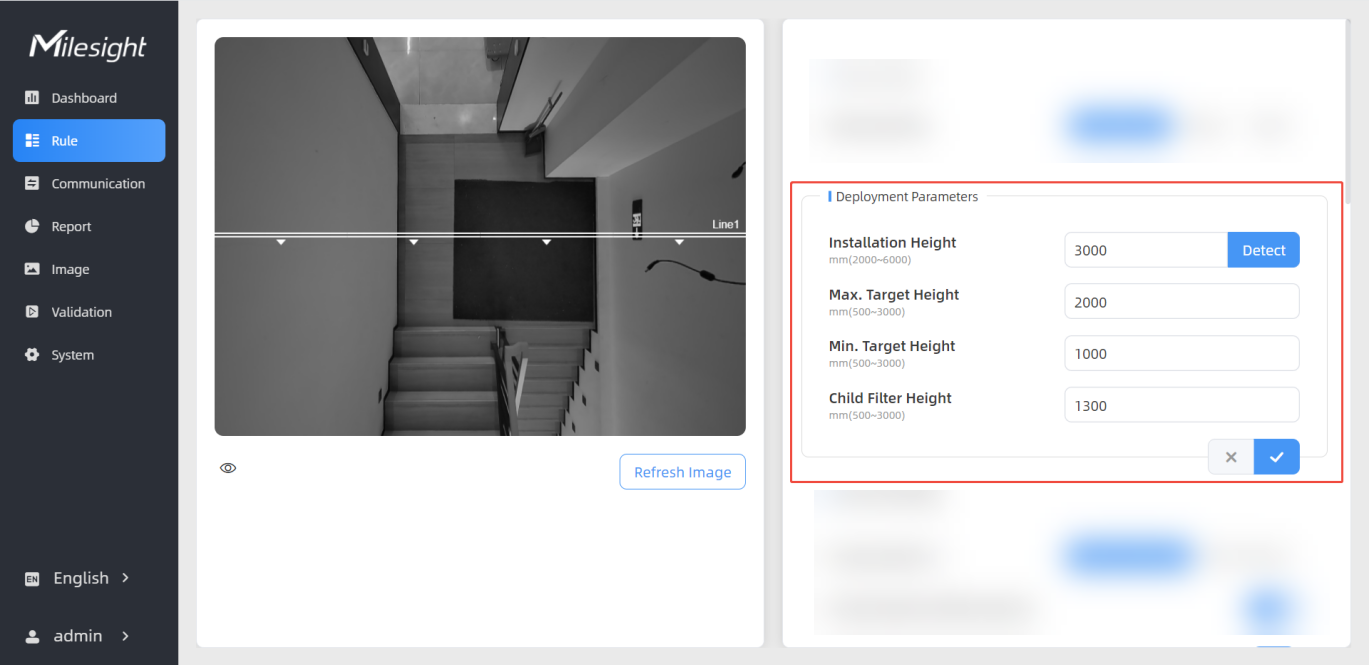
Parameters Description Installation Height Set the device installation height manually or automatically. - To set height manually: Enter a value between 2000 and
6000 mm. Note: For optimal performance of attribute recognition functions (Gender Recognition, Child & Adult Differentiation, Staff Detection, View Direction Detection), the installation height must not exceed 4 meters.
- To set height automatically: click Detect to
detect the current installation height.Note: The accuracy of automatic height detection may be compromised under low-texture ground conditions or in low-light environments such as at night.
Max. Target Height Set the maximum target height. The device ignores the objects detected above this value. Range: 500-3000 mm. Min. Target Height Set the minimum target height. The device ignores the objects detected below this value. Range: 500-3000 mm. Child Filter Height This parameter is displayed only when the Children&Adult Differentiation feature is enabled. It sets the maximum child height. Range: 500-3000 mm. For configuration details, refer to Configure Children & Adult Differentiation. - To set height manually: Enter a value between 2000 and
6000 mm.
- Click
 to save the configuration.