Device Access Network
This chapter describes how to configure the network for collecting data from terminal devices.
Configure LoRaWAN® Network
The LoRaWAN® Network is preloaded by default and cannot be deleted.
Steps:
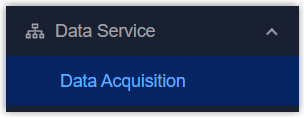
- On the left bar, select Data Service > Data
Acquisition page.
- On the top bar, select Device Access
Network tab.

- Click
 to select the channel plan. Other parameters
can retain their default values or be customized as needed.
to select the channel plan. Other parameters
can retain their default values or be customized as needed.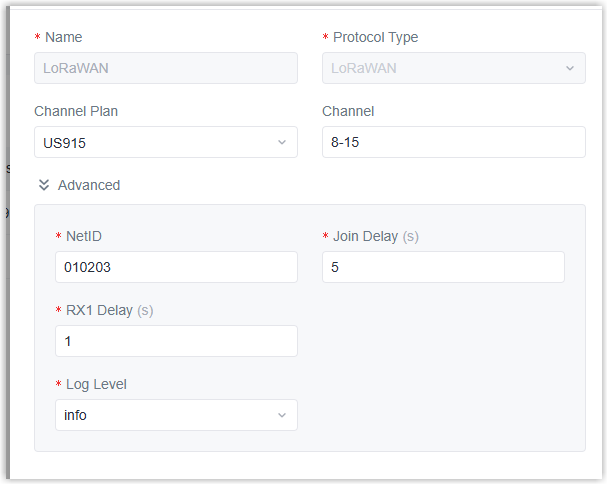
Parameter Description Channel Plan Select the channel plan of the network. The options vary by model: -868M: EU868, IN865, RU864
-915M: AU915, US915, KR920, AS923-1/2/3/4
-470M: CN470Channel Allow end devices to communicate via specific frequency channels by entering the channel indexes. This feature only works with CN470/US915/AU915 channel plans. Examples: 1,40: Enable Channel 1 and 40
1-40: Enable Channel 1-40
1-40, 60: Enable Channel 1-40 and 60
Null: Enable all channelsAdditional Channels Enable or disable additional channels as required. This feature only works with channel plans other than US915/AU915/CN470. Advanced NetID The unique identifier used by end devices to identify the network server. Join Delay Define the interval during which the end device waits for the Join Accept message after sending the Join Request. RX1 Delay Define the delay time after which the end device waits for the first receive window (RX1) to open. Log Level Select the level for recording logs. - Click Save to save the settings.
Add Device Access Network
The device supports adding various types of network.
Steps:
- On the left bar, select Data Service > Data
Acquisition page.
- On the top bar, select Device Access
Network tab.
- Click +Add to add a new network and configure the basic
parameters.
Parameter Description Name Define a unique name for the network. Protocol Type Select the protocol type based on the terminal devices: BACnet/IP, BACnet MS/TP, Modbus RTU, Modbus TCP, Modbus RTU over TCP, KNX/TP. - Configure the network parameters according to the protocol type.
- BACnet/IP
-
Parameter Description Network Interface Select network interface for communicating with other BACnet/IP terminal devices. Advanced Device Instance Nr Define the unique identifier of the gateway in the BACnet/IP network. UDP Port Set the communication port. Timeout Define the time to wait for terminal devices to respond after sending commands each time. Retry times Define the number of retries for send commands to terminal devices if there is no response. Keep Alive Interval Define the interval for sending heartbeat packets to terminal devices to check their online/offline status. If there is no response after 3 attempts, the terminal device will be considered Offline.
- BACnet MS/TP
-
Parameter Description Physical Interface Select the RS485 interface for connecting to BACnet MS/TP terminal devices. Baud Rate Select the serial data transmission rate. Data Bits The number of data bits for each character. It is fixed at 8. Stop Bits Indicates the end of each data frame, enabling the receiver to determine if a frame is complete. Options: 1, 2 Parity This is used to detect errors during transmission. Options: None, Odd, Even. DIP Enable or disable to add a 120Ω termination resistor across terminals A and B, eliminating signal reflections from the cable ends. Advanced Device Instance Nr Define the unique identifier of the gateway within the BACnet MS/TP network. MAC Address Define the unique MAC address of the gateway within the BACnet MS/TP network. Range: 0-127 Max Master Define the highest MAC address that a device will search for when looking for other masters on the network. Max Info Frames Define the maximum number of data frames a device can send before passing the token another device on the network. Timeout Define the time to wait for terminal devices to respond after sending commands each time. Retry times Define the number of retries for send commands to terminal devices if there is no response. Keep Alive Interval Define the interval for sending heartbeat packets to terminal devices to check their online/offline status. If there is no response after 3 attempts, the terminal device will be considered Offline.
- Modbus TCP or Modbus RTU over TCP
-
Parameter Description Timeout Define the time to wait for terminal devices to respond after sending commands each time. Retry times Define the number of retries for send commands to terminal devices if there is no response. Keep Alive Interval Define the interval for sending heartbeat packets to terminal devices to check their online/offline status. If there is no response after 3 attempts, the terminal device will be considered Offline.
- Modbus RTU
-
Parameter Description Physical Interface Select the RS485 interface for connecting to Modbus server (slave) devices. Baud Rate Select the serial data transmission rate. Data Bits The number of data bits for each character. It is fixed at 8. Stop Bits Indicates the end of each data frame, enabling the receiver to determine if a frame is complete. Options: 1, 2 Parity This is used to detect errors during transmission. Options: None, Odd, Even. DIP Enable or disable to add a 120Ω termination resistor across terminals A and B, eliminating signal reflections from the cable ends. Advanced Timeout Define the time to wait for terminal devices to respond after sending commands each time. Retry times Define the number of retries for send commands to terminal devices if there is no response. Keep Alive Interval Define the interval for sending heartbeat packets to terminal devices to check their online/offline status. If there is no response after 3 attempts, the terminal device will be considered Offline. Interframe Delay Define the delay time between two consecutive Modbus RTU commands.
- KNX/TP
-
Parameter Description Physical Address Define the unique physical address of the gateway within the KNX bus network. Advanced Timeout Define the time to wait for terminal devices to respond after sending commands each time. Retry times Define the number of retries for send commands to terminal devices if there is no response. Keep Alive Interval Define the interval for sending heartbeat packets to terminal devices to check their online/offline status. If there is no response after 3 attempts, the terminal device will be considered Offline.
- Click Save to save the settings.
- Click to edit the network parameters, or click
 to delete the network if needed.