Gateway Fleet
This chapter describes how to add agent gateways to this device.
Overview
Milesight LoRaWAN® gateways can form a multi-gateway architecture using the Gateway Fleet function, enabling different gateways to provide failover for each other, extend signal coverage, and allow a single sensor to roam across multiple gateways. One gateway (referred to as the Controller Gateway) can act as the network server, while other gateways (referred to as Agent Gateways) function solely as packet forwarders and transmit all data packets to the Controller Gateway.
The EG71 can act as a Controller Gateway to receive data from other Milesight LoRaWAN® gateways.
Prerequisites
- Agent Gateway: Any other Milesight LoRaWAN® gateways other than the EG71
- The EG71 gateway has a public IP address or is reachable by other gateways.
Add Agent Gateway
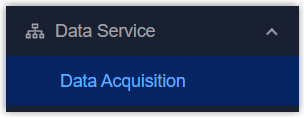
- On the left bar, select Data Service > Data
Acquisition page.
- On the top bar, select LoRaWAN tab, then select Gateway Fleet tab.
- Click +Add to add an agent gateway.
- Configure the agent gateway parameters, click Save.
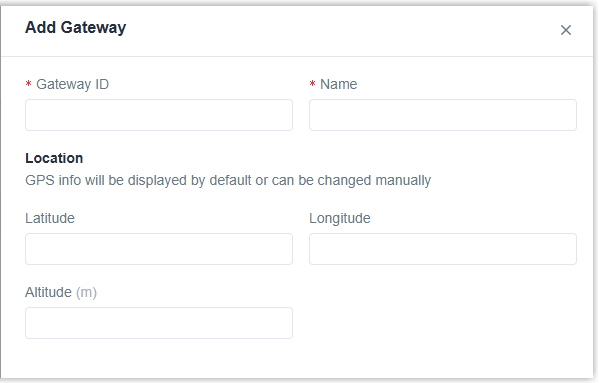
Parameter Description Gateway ID This can be found on the Packet Forward configuration page of agent gateway. Name Define a recognizable name for the agent gateway. Location Enter the gateway's latitude, longitude, and altitude. If the agent gateway supports GPS, the location information will be updated automatically here. - Select the packet forward type of the agent gateway to Remote Embedded NS and configure the server address as the EG71 gateway's address. For details, please refer to the corresponding gateway user guides.
- Check connection status of the agent gateway.

-
Click
 to edit the gateway info or click
  to delete the gateway as required.